Korg EXB-RADIAS for M3 Owner's manual, Page 63

Go to Korg EXB-RADIAS for M3 Owner's manual, Page 1

1

Go to Korg EXB-RADIAS for M3 Owner's manual, Page 2

2

Go to Korg EXB-RADIAS for M3 Owner's manual, Page 3

3

Go to Korg EXB-RADIAS for M3 Owner's manual, Page 4

4

Go to Korg EXB-RADIAS for M3 Owner's manual, Page 5

5

Go to Korg EXB-RADIAS for M3 Owner's manual, Page 6

6

Go to Korg EXB-RADIAS for M3 Owner's manual, Page 7

7

Go to Korg EXB-RADIAS for M3 Owner's manual, Page 8

8

Go to Korg EXB-RADIAS for M3 Owner's manual, Page 9

9

Go to Korg EXB-RADIAS for M3 Owner's manual, Page 10

10

Go to Korg EXB-RADIAS for M3 Owner's manual, Page 11

11

Go to Korg EXB-RADIAS for M3 Owner's manual, Page 12

12

Go to Korg EXB-RADIAS for M3 Owner's manual, Page 13

13

Go to Korg EXB-RADIAS for M3 Owner's manual, Page 14

14

Go to Korg EXB-RADIAS for M3 Owner's manual, Page 15

15

Go to Korg EXB-RADIAS for M3 Owner's manual, Page 16

16

Go to Korg EXB-RADIAS for M3 Owner's manual, Page 17

17

Go to Korg EXB-RADIAS for M3 Owner's manual, Page 18

18

Go to Korg EXB-RADIAS for M3 Owner's manual, Page 19

19

Go to Korg EXB-RADIAS for M3 Owner's manual, Page 20

20

Go to Korg EXB-RADIAS for M3 Owner's manual, Page 21

21

Go to Korg EXB-RADIAS for M3 Owner's manual, Page 22

22

Go to Korg EXB-RADIAS for M3 Owner's manual, Page 23

23

Go to Korg EXB-RADIAS for M3 Owner's manual, Page 24

24

Go to Korg EXB-RADIAS for M3 Owner's manual, Page 25

25

Go to Korg EXB-RADIAS for M3 Owner's manual, Page 26

26

Go to Korg EXB-RADIAS for M3 Owner's manual, Page 27

27

Go to Korg EXB-RADIAS for M3 Owner's manual, Page 28

28

Go to Korg EXB-RADIAS for M3 Owner's manual, Page 29

29

Go to Korg EXB-RADIAS for M3 Owner's manual, Page 30

30

Go to Korg EXB-RADIAS for M3 Owner's manual, Page 31

31

Go to Korg EXB-RADIAS for M3 Owner's manual, Page 32

32

Go to Korg EXB-RADIAS for M3 Owner's manual, Page 33

33

Go to Korg EXB-RADIAS for M3 Owner's manual, Page 34

34

Go to Korg EXB-RADIAS for M3 Owner's manual, Page 35

35

Go to Korg EXB-RADIAS for M3 Owner's manual, Page 36

36

Go to Korg EXB-RADIAS for M3 Owner's manual, Page 37

37

Go to Korg EXB-RADIAS for M3 Owner's manual, Page 38

38

Go to Korg EXB-RADIAS for M3 Owner's manual, Page 39

39

Go to Korg EXB-RADIAS for M3 Owner's manual, Page 40

40

Go to Korg EXB-RADIAS for M3 Owner's manual, Page 41

41

Go to Korg EXB-RADIAS for M3 Owner's manual, Page 42

42

Go to Korg EXB-RADIAS for M3 Owner's manual, Page 43

43

Go to Korg EXB-RADIAS for M3 Owner's manual, Page 44

44

Go to Korg EXB-RADIAS for M3 Owner's manual, Page 45

45

Go to Korg EXB-RADIAS for M3 Owner's manual, Page 46

46

Go to Korg EXB-RADIAS for M3 Owner's manual, Page 47

47

Go to Korg EXB-RADIAS for M3 Owner's manual, Page 48

48

Go to Korg EXB-RADIAS for M3 Owner's manual, Page 49

49

Go to Korg EXB-RADIAS for M3 Owner's manual, Page 50

50

Go to Korg EXB-RADIAS for M3 Owner's manual, Page 51

51

Go to Korg EXB-RADIAS for M3 Owner's manual, Page 52

52

Go to Korg EXB-RADIAS for M3 Owner's manual, Page 53

53

Go to Korg EXB-RADIAS for M3 Owner's manual, Page 54

54

Go to Korg EXB-RADIAS for M3 Owner's manual, Page 55

55

Go to Korg EXB-RADIAS for M3 Owner's manual, Page 56

56

Go to Korg EXB-RADIAS for M3 Owner's manual, Page 57

57

Go to Korg EXB-RADIAS for M3 Owner's manual, Page 58

58

Go to Korg EXB-RADIAS for M3 Owner's manual, Page 59

59

Go to Korg EXB-RADIAS for M3 Owner's manual, Page 60

60

Go to Korg EXB-RADIAS for M3 Owner's manual, Page 61

61

Go to Korg EXB-RADIAS for M3 Owner's manual, Page 62

62

Go to Korg EXB-RADIAS for M3 Owner's manual, Page 63

63

Go to Korg EXB-RADIAS for M3 Owner's manual, Page 64

64

Go to Korg EXB-RADIAS for M3 Owner's manual, Page 65

65

Go to Korg EXB-RADIAS for M3 Owner's manual, Page 66

66

Go to Korg EXB-RADIAS for M3 Owner's manual, Page 67

67

Go to Korg EXB-RADIAS for M3 Owner's manual, Page 68

68

Go to Korg EXB-RADIAS for M3 Owner's manual, Page 69

69

Go to Korg EXB-RADIAS for M3 Owner's manual, Page 70

70

Go to Korg EXB-RADIAS for M3 Owner's manual, Page 71

71

Go to Korg EXB-RADIAS for M3 Owner's manual, Page 72

72

Go to Korg EXB-RADIAS for M3 Owner's manual, Page 73

73

Go to Korg EXB-RADIAS for M3 Owner's manual, Page 74

74

Go to Korg EXB-RADIAS for M3 Owner's manual, Page 75

75

Go to Korg EXB-RADIAS for M3 Owner's manual, Page 76

76

Go to Korg EXB-RADIAS for M3 Owner's manual, Page 77

77

Go to Korg EXB-RADIAS for M3 Owner's manual, Page 78

78

Illustration: Korg EXB-RADIAS for M3 Owner's manual, Page 63
COMBI P4: Zone/Delay 3–7: Other T01-08, 3–8: Other T09-16
55
of the RADIAS program used by the timbre. However, a
RADIAS program cannot be detuned farther than +/-50
cents. Values below -50 are treated as -50, and values above
+50 are treated as +50.
For more information, please see “Detune (Use BPM Adjust
in Menu)” on page 151 of the M3 parameter guide.
Bend Range [PRG, –24...+00...+24]
Specifies the amount of pitch change that will occur when
the pitch bender is operated, in semitone units.
PRG: The pitch range specified by the program will be used.
–24…+24: This setting will be used regardless of the setting
in the program.
The actual bend range is determined by adding this value to
the Bend Range (Program 2-2a) of the RADIAS program
used by the timbre. However, a RADIAS program cannot
have a bend range greater than +/-12. Values below -12 are
treated as -12, and values above +12 are treated as +12.
Timbre 02...08, 09...16 (Timbre Number):
Here you can make pitch-related settings for each timbre 2–
16. The settings are the same as for timbre 1. See “Timbre 01
(Timbre Number)”:.
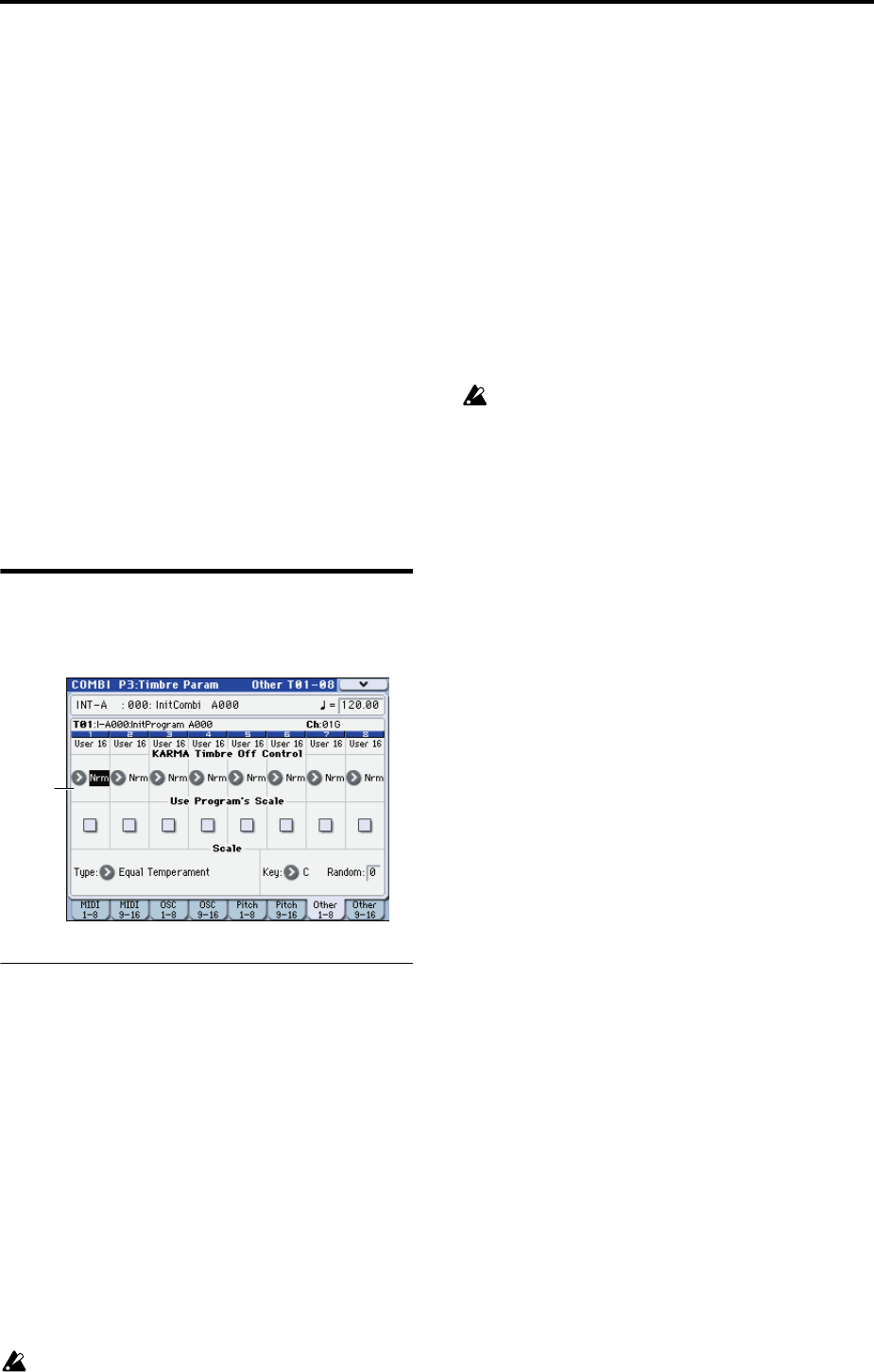
3–7: Other T01-08,
3–8: Other T09-16
3–7(8)c: KARMA/Scale
Timbre 01…16 (Timbre Number):
KARMA Timbre Off Control
[Normal, Timbre Off by KARMA Off, Timbre Off by
KARMA On]
Use Programs Scale [Off, On]
For details on these parameters, please see “3–7(8)c:
KARMA/Scale” on page 152 of the M3 parameter guide.
Scale:
Specifies the scale that the combination will use.
Type (Combi’s Scale)
[Equal Temperament…User Octave Scale15]
Selects the scale.
If you select a scale that cannot be specified for a
RADIAS program, such as Stretch, User All Notes
Scale, or User Octave Scale 01–15, the program will play
using Equal Temperament.
Key [C…B]
Random [0…7]
For more information, please see “3–7(8)c: KARMA/Scale”
on page 152 of the M3 parameter guide.
COMBI P4: Zone/Delay
Here you can specify the key range and velocity range for
which timbres 1–8 and 9–16 will sound, and specify the
delay time until the sound will be heard.
For details on the available parameters and menu
commands, please see “COMBI P4: Zone/Delay” on page
153 of the M3 parameter guide.
The Keyboard Zones / Velocity Zones “Top Slope” and
“Bottom Slope” settings will have no effect for RADIAS
program.
COMBI P5: MIDI Filter
These settings allow you to apply filters to the MIDI data
that will be transmitted and received by each timbre 1–16.
For details on the available parameters and menu
commands, please see “COMBI P5: MIDI Filter” on page 157
of the M3 parameter guide.
COMBI P7: KARMA
Here you can make KARMA function settings for the
Combination mode.
For details on the available parameters and menu
commands, please see “COMBI P7: KARMA” on page 161 of
the M3 parameter guide.
COMBI P8: IFX (Insert Effects)
Here you can specify the bus and insert effect for timbres 1–
16.
For details on the available parameters and menu
commands, please see “COMBI P8: IFX (Insert Effect)” on
page 177 of the M3 parameter guide.
COMBI P9: MFX/TFX
(Master/Total Effects)
Here you can make settings for the master effects and total
effects.
For details on the available parameters and menu
commands, please see “COMBI P9: MFX/TFX (Master/
Total Effect)” on page 183 of the M3 parameter guide.
3–3c