Korg EXB-RADIAS for M3 Owner's manual, Page 62

Go to Korg EXB-RADIAS for M3 Owner's manual, Page 1

1

Go to Korg EXB-RADIAS for M3 Owner's manual, Page 2

2

Go to Korg EXB-RADIAS for M3 Owner's manual, Page 3

3

Go to Korg EXB-RADIAS for M3 Owner's manual, Page 4

4

Go to Korg EXB-RADIAS for M3 Owner's manual, Page 5

5

Go to Korg EXB-RADIAS for M3 Owner's manual, Page 6

6

Go to Korg EXB-RADIAS for M3 Owner's manual, Page 7

7

Go to Korg EXB-RADIAS for M3 Owner's manual, Page 8

8

Go to Korg EXB-RADIAS for M3 Owner's manual, Page 9

9

Go to Korg EXB-RADIAS for M3 Owner's manual, Page 10

10

Go to Korg EXB-RADIAS for M3 Owner's manual, Page 11

11

Go to Korg EXB-RADIAS for M3 Owner's manual, Page 12

12

Go to Korg EXB-RADIAS for M3 Owner's manual, Page 13

13

Go to Korg EXB-RADIAS for M3 Owner's manual, Page 14

14

Go to Korg EXB-RADIAS for M3 Owner's manual, Page 15

15

Go to Korg EXB-RADIAS for M3 Owner's manual, Page 16

16

Go to Korg EXB-RADIAS for M3 Owner's manual, Page 17

17

Go to Korg EXB-RADIAS for M3 Owner's manual, Page 18

18

Go to Korg EXB-RADIAS for M3 Owner's manual, Page 19

19

Go to Korg EXB-RADIAS for M3 Owner's manual, Page 20

20

Go to Korg EXB-RADIAS for M3 Owner's manual, Page 21

21

Go to Korg EXB-RADIAS for M3 Owner's manual, Page 22

22

Go to Korg EXB-RADIAS for M3 Owner's manual, Page 23

23

Go to Korg EXB-RADIAS for M3 Owner's manual, Page 24

24

Go to Korg EXB-RADIAS for M3 Owner's manual, Page 25

25

Go to Korg EXB-RADIAS for M3 Owner's manual, Page 26

26

Go to Korg EXB-RADIAS for M3 Owner's manual, Page 27

27

Go to Korg EXB-RADIAS for M3 Owner's manual, Page 28

28

Go to Korg EXB-RADIAS for M3 Owner's manual, Page 29

29

Go to Korg EXB-RADIAS for M3 Owner's manual, Page 30

30

Go to Korg EXB-RADIAS for M3 Owner's manual, Page 31

31

Go to Korg EXB-RADIAS for M3 Owner's manual, Page 32

32

Go to Korg EXB-RADIAS for M3 Owner's manual, Page 33

33

Go to Korg EXB-RADIAS for M3 Owner's manual, Page 34

34

Go to Korg EXB-RADIAS for M3 Owner's manual, Page 35

35

Go to Korg EXB-RADIAS for M3 Owner's manual, Page 36

36

Go to Korg EXB-RADIAS for M3 Owner's manual, Page 37

37

Go to Korg EXB-RADIAS for M3 Owner's manual, Page 38

38

Go to Korg EXB-RADIAS for M3 Owner's manual, Page 39

39

Go to Korg EXB-RADIAS for M3 Owner's manual, Page 40

40

Go to Korg EXB-RADIAS for M3 Owner's manual, Page 41

41

Go to Korg EXB-RADIAS for M3 Owner's manual, Page 42

42

Go to Korg EXB-RADIAS for M3 Owner's manual, Page 43

43

Go to Korg EXB-RADIAS for M3 Owner's manual, Page 44

44

Go to Korg EXB-RADIAS for M3 Owner's manual, Page 45

45

Go to Korg EXB-RADIAS for M3 Owner's manual, Page 46

46

Go to Korg EXB-RADIAS for M3 Owner's manual, Page 47

47

Go to Korg EXB-RADIAS for M3 Owner's manual, Page 48

48

Go to Korg EXB-RADIAS for M3 Owner's manual, Page 49

49

Go to Korg EXB-RADIAS for M3 Owner's manual, Page 50

50

Go to Korg EXB-RADIAS for M3 Owner's manual, Page 51

51

Go to Korg EXB-RADIAS for M3 Owner's manual, Page 52

52

Go to Korg EXB-RADIAS for M3 Owner's manual, Page 53

53

Go to Korg EXB-RADIAS for M3 Owner's manual, Page 54

54

Go to Korg EXB-RADIAS for M3 Owner's manual, Page 55

55

Go to Korg EXB-RADIAS for M3 Owner's manual, Page 56

56

Go to Korg EXB-RADIAS for M3 Owner's manual, Page 57

57

Go to Korg EXB-RADIAS for M3 Owner's manual, Page 58

58

Go to Korg EXB-RADIAS for M3 Owner's manual, Page 59

59

Go to Korg EXB-RADIAS for M3 Owner's manual, Page 60

60

Go to Korg EXB-RADIAS for M3 Owner's manual, Page 61

61

Go to Korg EXB-RADIAS for M3 Owner's manual, Page 62

62

Go to Korg EXB-RADIAS for M3 Owner's manual, Page 63

63

Go to Korg EXB-RADIAS for M3 Owner's manual, Page 64

64

Go to Korg EXB-RADIAS for M3 Owner's manual, Page 65

65

Go to Korg EXB-RADIAS for M3 Owner's manual, Page 66

66

Go to Korg EXB-RADIAS for M3 Owner's manual, Page 67

67

Go to Korg EXB-RADIAS for M3 Owner's manual, Page 68

68

Go to Korg EXB-RADIAS for M3 Owner's manual, Page 69

69

Go to Korg EXB-RADIAS for M3 Owner's manual, Page 70

70

Go to Korg EXB-RADIAS for M3 Owner's manual, Page 71

71

Go to Korg EXB-RADIAS for M3 Owner's manual, Page 72

72

Go to Korg EXB-RADIAS for M3 Owner's manual, Page 73

73

Go to Korg EXB-RADIAS for M3 Owner's manual, Page 74

74

Go to Korg EXB-RADIAS for M3 Owner's manual, Page 75

75

Go to Korg EXB-RADIAS for M3 Owner's manual, Page 76

76

Go to Korg EXB-RADIAS for M3 Owner's manual, Page 77

77

Go to Korg EXB-RADIAS for M3 Owner's manual, Page 78

78

Illustration: Korg EXB-RADIAS for M3 Owner's manual, Page 62
54
COMBI P3: Timbre Parameters
3–1: MIDI T01–08,
3–2: MIDI T09–16
Here you can make MIDI settings for each timbre 1–16.
For details on the available parameters and menu
commands, please see “3–1: MIDI T01–08, 3–2: MIDI T09–
16” on page 149 of the M3 parameter guide.
3–3: OSC T01–08,
3–4: OSC T09–16
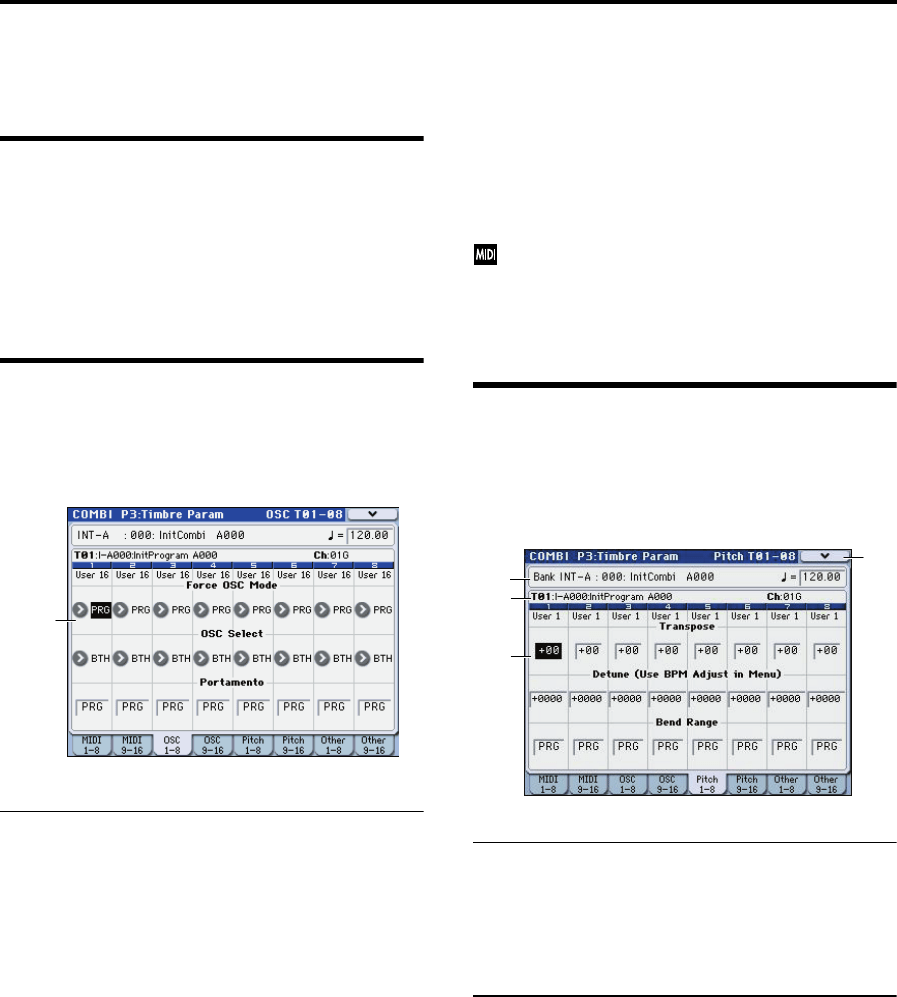
These settings specify how each timbre will be played.
3–3c: OSC
Timbre 01…16 (Timbre Number):
Force OSC Mode [PRG, Poly, MN, LGT]
Specifies the Voice Assign Mode (Program 1–1a) of the
RADIAS program selected
PRG: The Voice Assign Mode (p.25) settings of the
RADIAS program will be used.
Poly: The timbre will play polyphonically, regardless of the
settings of the RADIAS program.
MN (Mono): The timbre will play using a Voice Assign
Mode of Mono and a Trigger Mode of Multi, regardless of
the settings of the RADIAS program.
LGT (Legato): The timbre will play using a Voice Assign
Mode of Mono and a Trigger Mode of Single (p.25),
regardless of the settings of the RADIAS program.
If you’ve selected MN or LGT, the note priority order when
you play two or more keys will be according to the Priority
(Program 1-1a) setting of the program.
OSC Select [BTH, OS1, OS2]
This has no effect for RADIAS programs used by a timbre.
For more information, please see “OSC Select” on page 54 of
the M3 parameter guide.
Portamento [PRG, Off, 001...127]
Specifies the portamento for the RADIAS program used by
the timbre.
PRG: Portamento will be applied as specified by the
program settings.
Off: Portamento will be off, even if the original program
settings specified for it to be on.
001…127: Portamento will be applied with the portamento
time you specify here, even if it is turned off by the program
settings
If the Status (Combination 3–1a) is set to INT, CC#05
(portamento time) message will be received and will
control and change these settings. These messages will
be received on the MIDI channel specified for each
timbre by MIDI Channel (Combination 2–1a).
3–5: Pitch T01–08,
3–6: Pitch T09–16
Here you can make pitch-related settings for each timbre 1–
16.
3–5(6)a: Combination Name, Tempo
3–5(6)b: Timbre Info
For details on these parameters, please see “3–5(6)a:
Combination Name, Tempo 3–5(6)b: Timbre Info” on page
151 of the M3 parameter guide.
3–5(6)c: Pitch
Timbre 01 (Timbre Number):
Transpose [–60…+00…+60]
Adjusts the pitch in semitone steps for the RADIAS program
used by the timbre. A setting of +12 is one octave.
The actual pitch sounded by the program is determined by
adding this value to the Transpose setting (Program 2-2a) of
the RADIAS program used by the timbre. However, a
RADIAS program cannot be transposed farther than +/-48.
Values below -48 are treated as -48, and values above +48 are
treated as +48.
For more information, please see “Transpose” on page 151
of the M3 parameter guide.
Detune
(Use BPM Adjust in Menu)
[–1200...+0000...+1200]
Adjusts the pitch in one-cent units from the normal pitch for
the RADIAS program used by the timbre.
The actual pitch sounded by the program is determined by
adding this value to the Tune (cents) setting (Program 2-2a)
3–3c
3–5a
3–5b
3–5c
3–5
MC