Korg EXB-RADIAS for M3 Owner's manual, Page 48

Go to Korg EXB-RADIAS for M3 Owner's manual, Page 1

1

Go to Korg EXB-RADIAS for M3 Owner's manual, Page 2

2

Go to Korg EXB-RADIAS for M3 Owner's manual, Page 3

3

Go to Korg EXB-RADIAS for M3 Owner's manual, Page 4

4

Go to Korg EXB-RADIAS for M3 Owner's manual, Page 5

5

Go to Korg EXB-RADIAS for M3 Owner's manual, Page 6

6

Go to Korg EXB-RADIAS for M3 Owner's manual, Page 7

7

Go to Korg EXB-RADIAS for M3 Owner's manual, Page 8

8

Go to Korg EXB-RADIAS for M3 Owner's manual, Page 9

9

Go to Korg EXB-RADIAS for M3 Owner's manual, Page 10

10

Go to Korg EXB-RADIAS for M3 Owner's manual, Page 11

11

Go to Korg EXB-RADIAS for M3 Owner's manual, Page 12

12

Go to Korg EXB-RADIAS for M3 Owner's manual, Page 13

13

Go to Korg EXB-RADIAS for M3 Owner's manual, Page 14

14

Go to Korg EXB-RADIAS for M3 Owner's manual, Page 15

15

Go to Korg EXB-RADIAS for M3 Owner's manual, Page 16

16

Go to Korg EXB-RADIAS for M3 Owner's manual, Page 17

17

Go to Korg EXB-RADIAS for M3 Owner's manual, Page 18

18

Go to Korg EXB-RADIAS for M3 Owner's manual, Page 19

19

Go to Korg EXB-RADIAS for M3 Owner's manual, Page 20

20

Go to Korg EXB-RADIAS for M3 Owner's manual, Page 21

21

Go to Korg EXB-RADIAS for M3 Owner's manual, Page 22

22

Go to Korg EXB-RADIAS for M3 Owner's manual, Page 23

23

Go to Korg EXB-RADIAS for M3 Owner's manual, Page 24

24

Go to Korg EXB-RADIAS for M3 Owner's manual, Page 25

25

Go to Korg EXB-RADIAS for M3 Owner's manual, Page 26

26

Go to Korg EXB-RADIAS for M3 Owner's manual, Page 27

27

Go to Korg EXB-RADIAS for M3 Owner's manual, Page 28

28

Go to Korg EXB-RADIAS for M3 Owner's manual, Page 29

29

Go to Korg EXB-RADIAS for M3 Owner's manual, Page 30

30

Go to Korg EXB-RADIAS for M3 Owner's manual, Page 31

31

Go to Korg EXB-RADIAS for M3 Owner's manual, Page 32

32

Go to Korg EXB-RADIAS for M3 Owner's manual, Page 33

33

Go to Korg EXB-RADIAS for M3 Owner's manual, Page 34

34

Go to Korg EXB-RADIAS for M3 Owner's manual, Page 35

35

Go to Korg EXB-RADIAS for M3 Owner's manual, Page 36

36

Go to Korg EXB-RADIAS for M3 Owner's manual, Page 37

37

Go to Korg EXB-RADIAS for M3 Owner's manual, Page 38

38

Go to Korg EXB-RADIAS for M3 Owner's manual, Page 39

39

Go to Korg EXB-RADIAS for M3 Owner's manual, Page 40

40

Go to Korg EXB-RADIAS for M3 Owner's manual, Page 41

41

Go to Korg EXB-RADIAS for M3 Owner's manual, Page 42

42

Go to Korg EXB-RADIAS for M3 Owner's manual, Page 43

43

Go to Korg EXB-RADIAS for M3 Owner's manual, Page 44

44

Go to Korg EXB-RADIAS for M3 Owner's manual, Page 45

45

Go to Korg EXB-RADIAS for M3 Owner's manual, Page 46

46

Go to Korg EXB-RADIAS for M3 Owner's manual, Page 47

47

Go to Korg EXB-RADIAS for M3 Owner's manual, Page 48

48

Go to Korg EXB-RADIAS for M3 Owner's manual, Page 49

49

Go to Korg EXB-RADIAS for M3 Owner's manual, Page 50

50

Go to Korg EXB-RADIAS for M3 Owner's manual, Page 51

51

Go to Korg EXB-RADIAS for M3 Owner's manual, Page 52

52

Go to Korg EXB-RADIAS for M3 Owner's manual, Page 53

53

Go to Korg EXB-RADIAS for M3 Owner's manual, Page 54

54

Go to Korg EXB-RADIAS for M3 Owner's manual, Page 55

55

Go to Korg EXB-RADIAS for M3 Owner's manual, Page 56

56

Go to Korg EXB-RADIAS for M3 Owner's manual, Page 57

57

Go to Korg EXB-RADIAS for M3 Owner's manual, Page 58

58

Go to Korg EXB-RADIAS for M3 Owner's manual, Page 59

59

Go to Korg EXB-RADIAS for M3 Owner's manual, Page 60

60

Go to Korg EXB-RADIAS for M3 Owner's manual, Page 61

61

Go to Korg EXB-RADIAS for M3 Owner's manual, Page 62

62

Go to Korg EXB-RADIAS for M3 Owner's manual, Page 63

63

Go to Korg EXB-RADIAS for M3 Owner's manual, Page 64

64

Go to Korg EXB-RADIAS for M3 Owner's manual, Page 65

65

Go to Korg EXB-RADIAS for M3 Owner's manual, Page 66

66

Go to Korg EXB-RADIAS for M3 Owner's manual, Page 67

67

Go to Korg EXB-RADIAS for M3 Owner's manual, Page 68

68

Go to Korg EXB-RADIAS for M3 Owner's manual, Page 69

69

Go to Korg EXB-RADIAS for M3 Owner's manual, Page 70

70

Go to Korg EXB-RADIAS for M3 Owner's manual, Page 71

71

Go to Korg EXB-RADIAS for M3 Owner's manual, Page 72

72

Go to Korg EXB-RADIAS for M3 Owner's manual, Page 73

73

Go to Korg EXB-RADIAS for M3 Owner's manual, Page 74

74

Go to Korg EXB-RADIAS for M3 Owner's manual, Page 75

75

Go to Korg EXB-RADIAS for M3 Owner's manual, Page 76

76

Go to Korg EXB-RADIAS for M3 Owner's manual, Page 77

77

Go to Korg EXB-RADIAS for M3 Owner's manual, Page 78

78

Illustration: Korg EXB-RADIAS for M3 Owner's manual, Page 48
Parameter guide
40
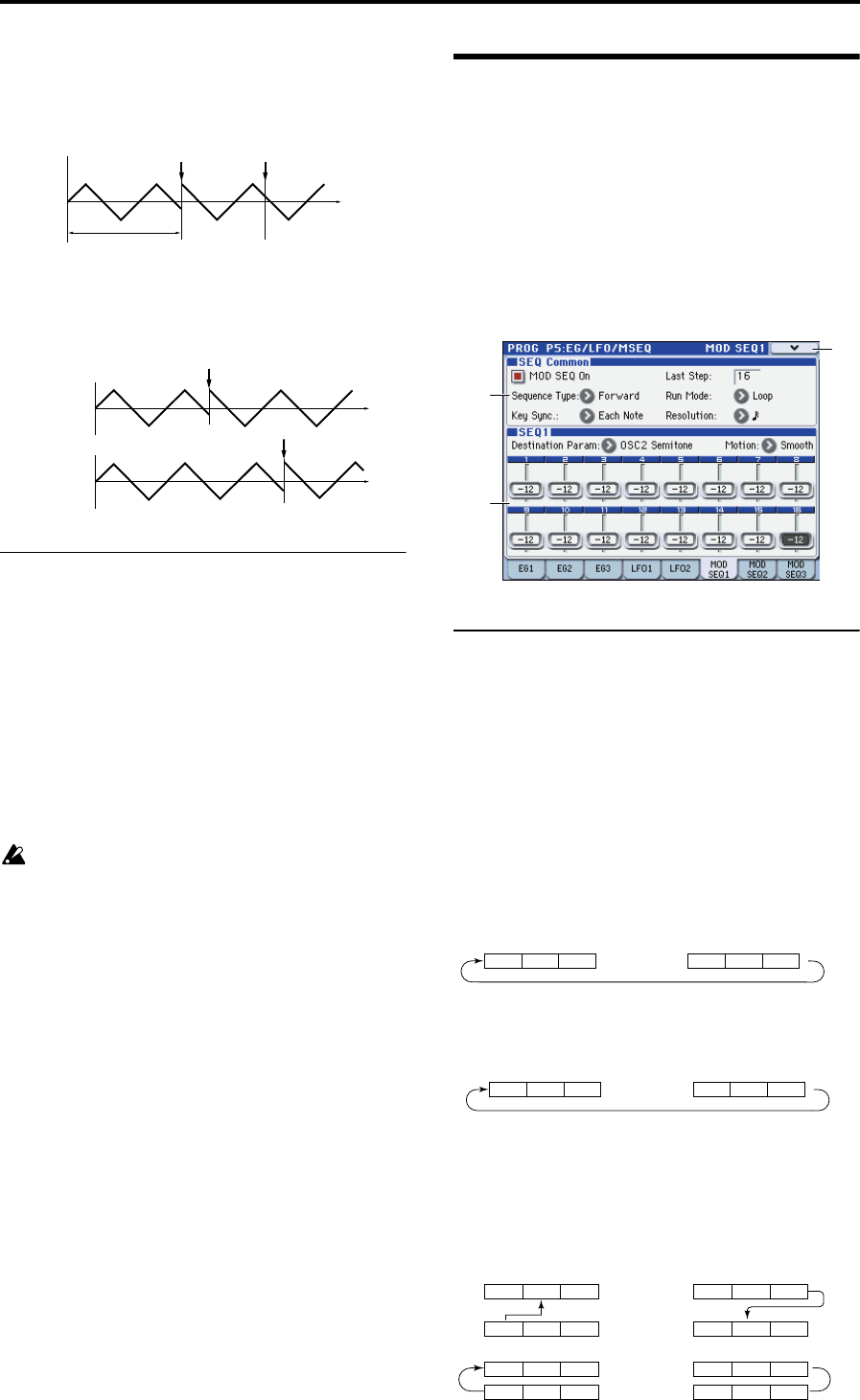
1st Note: The phase of the LFO will be reset at the first note-
on that occurs when no other keys are being pressed, and
will continue to affect all the notes played by that timbre in
the same way, until once again no keys are being held down.
Each Note: The phase of the LFO will be reset for each
individual note-on, and each voice will be modulated at an
independent phase.
5–4(5)b: Frequency MIDI/Tempo Sync.
MIDI/Tempo Sync. [Off, On]
Specifies the LFO frequency. This lets you produce vibrato,
wah, auto-pan, or tremolo effects that are synchronized to
the modulation sequencer, KARMA, the internal sequencer,
or an external sequencer.
On (checked): The LFO frequency will synchronize to the
specified tempo (MIDI clock). Use the Base Note parameter
below to specify the LFO speed. The Frequency setting is
ignored.
Off (unchecked): The LFO speed will be determined by the
Frequency setting, and will not be affected by the tempo
setting.
If MIDI/Tempo Sync is On, setting a virtual patch
modulation destination (Dst) to LFO1 (LFO1 Freq) will
have no effect.
Base Note (Sync. Base Note) [8/1… ]
Specifies the LFO frequency as a note value based on the
tempo. This is shown and can be edited if MIDI/
TempoSync. is On.
Relative to the tempo, the length of the note value specified
here will be one cycle of the LFO. For example if this is set to
each cycle of the LFO will occupy one quarter note.
5–6: MSEQ1,
5–7: MSEQ2,
5–8: MSESQ3
Here you can make settings for the modulation sequencer.
Here you can:
Specify the number of steps, the type, and playback
method for a modulation sequence.
Select the parameter that will be modulated, and specify
the value of each step.
5–6(7)(8)a: SEQ Common
These parameters are common to SEQ1, SEQ2, and SEQ3.
MOD SEQ On (Modulation Sequencer On)
[Off, On]
Switches the modulation sequencer on/off.
Last Step [01…16]
Specifies the length of the sequence in steps (i.e., the
maximum number of steps).
Sequence Type [Forward, Reverse, Alt1, Alt2]
Specifies the sequence type (the direction in which the
sequence will play).
Forward: Play from the first step (Step01).
Reverse: Play from the last step (the step number specified
by Last Step) in reverse.
Alt1, Alt2: Alternately play in Forward and Reverse
directions. Alt 1 immediately changes direction at the end
points, so the first step and last steps are played only once
per loop. Alt 2 plays the first step and the last step on both
the way up and on the way down, so these steps will be
played twice per loop.
Note on Note on
Note all off
Note on
Note on
Voice 1
Voice 2
5–6a
5–6b
5–6
MC
Step 01 Step 02 Step 03 Step 14 Step 15 Step 16
• • • • • • • • •
Sequence Type: Forward, Run Mode: Loop, Last Step: 16
Step 16 Step 15 Step 14 Step 03 Step 02 Step 01
• • • • • • • • •
Sequence Type: Reverse, Run Mode: Loop, Last Step: 16
Step 01 Step 02 Step 03 Step 14 Step 15 Step 16
• • • • • • • • •
Step 01 Step 02 Step 03 Step 14 Step 15 Step 16
• • • • • • • • •
Sequence Type: Alt2, Run Mode: Loop, Last Step: 16
Step 01 Step 02 Step 03 Step 14 Step 15 Step 16
• • • • • • • • •
Step 01 Step 02 Step 03 Step 14 Step 15 Step 16
• • • • • • • • •
Sequence Type: Alt1, Run Mode: Loop, Last Step: 16