Korg EXB-RADIAS for M3 Owner's manual, Page 41

Go to Korg EXB-RADIAS for M3 Owner's manual, Page 1

1

Go to Korg EXB-RADIAS for M3 Owner's manual, Page 2

2

Go to Korg EXB-RADIAS for M3 Owner's manual, Page 3

3

Go to Korg EXB-RADIAS for M3 Owner's manual, Page 4

4

Go to Korg EXB-RADIAS for M3 Owner's manual, Page 5

5

Go to Korg EXB-RADIAS for M3 Owner's manual, Page 6

6

Go to Korg EXB-RADIAS for M3 Owner's manual, Page 7

7

Go to Korg EXB-RADIAS for M3 Owner's manual, Page 8

8

Go to Korg EXB-RADIAS for M3 Owner's manual, Page 9

9

Go to Korg EXB-RADIAS for M3 Owner's manual, Page 10

10

Go to Korg EXB-RADIAS for M3 Owner's manual, Page 11

11

Go to Korg EXB-RADIAS for M3 Owner's manual, Page 12

12

Go to Korg EXB-RADIAS for M3 Owner's manual, Page 13

13

Go to Korg EXB-RADIAS for M3 Owner's manual, Page 14

14

Go to Korg EXB-RADIAS for M3 Owner's manual, Page 15

15

Go to Korg EXB-RADIAS for M3 Owner's manual, Page 16

16

Go to Korg EXB-RADIAS for M3 Owner's manual, Page 17

17

Go to Korg EXB-RADIAS for M3 Owner's manual, Page 18

18

Go to Korg EXB-RADIAS for M3 Owner's manual, Page 19

19

Go to Korg EXB-RADIAS for M3 Owner's manual, Page 20

20

Go to Korg EXB-RADIAS for M3 Owner's manual, Page 21

21

Go to Korg EXB-RADIAS for M3 Owner's manual, Page 22

22

Go to Korg EXB-RADIAS for M3 Owner's manual, Page 23

23

Go to Korg EXB-RADIAS for M3 Owner's manual, Page 24

24

Go to Korg EXB-RADIAS for M3 Owner's manual, Page 25

25

Go to Korg EXB-RADIAS for M3 Owner's manual, Page 26

26

Go to Korg EXB-RADIAS for M3 Owner's manual, Page 27

27

Go to Korg EXB-RADIAS for M3 Owner's manual, Page 28

28

Go to Korg EXB-RADIAS for M3 Owner's manual, Page 29

29

Go to Korg EXB-RADIAS for M3 Owner's manual, Page 30

30

Go to Korg EXB-RADIAS for M3 Owner's manual, Page 31

31

Go to Korg EXB-RADIAS for M3 Owner's manual, Page 32

32

Go to Korg EXB-RADIAS for M3 Owner's manual, Page 33

33

Go to Korg EXB-RADIAS for M3 Owner's manual, Page 34

34

Go to Korg EXB-RADIAS for M3 Owner's manual, Page 35

35

Go to Korg EXB-RADIAS for M3 Owner's manual, Page 36

36

Go to Korg EXB-RADIAS for M3 Owner's manual, Page 37

37

Go to Korg EXB-RADIAS for M3 Owner's manual, Page 38

38

Go to Korg EXB-RADIAS for M3 Owner's manual, Page 39

39

Go to Korg EXB-RADIAS for M3 Owner's manual, Page 40

40

Go to Korg EXB-RADIAS for M3 Owner's manual, Page 41

41

Go to Korg EXB-RADIAS for M3 Owner's manual, Page 42

42

Go to Korg EXB-RADIAS for M3 Owner's manual, Page 43

43

Go to Korg EXB-RADIAS for M3 Owner's manual, Page 44

44

Go to Korg EXB-RADIAS for M3 Owner's manual, Page 45

45

Go to Korg EXB-RADIAS for M3 Owner's manual, Page 46

46

Go to Korg EXB-RADIAS for M3 Owner's manual, Page 47

47

Go to Korg EXB-RADIAS for M3 Owner's manual, Page 48

48

Go to Korg EXB-RADIAS for M3 Owner's manual, Page 49

49

Go to Korg EXB-RADIAS for M3 Owner's manual, Page 50

50

Go to Korg EXB-RADIAS for M3 Owner's manual, Page 51

51

Go to Korg EXB-RADIAS for M3 Owner's manual, Page 52

52

Go to Korg EXB-RADIAS for M3 Owner's manual, Page 53

53

Go to Korg EXB-RADIAS for M3 Owner's manual, Page 54

54

Go to Korg EXB-RADIAS for M3 Owner's manual, Page 55

55

Go to Korg EXB-RADIAS for M3 Owner's manual, Page 56

56

Go to Korg EXB-RADIAS for M3 Owner's manual, Page 57

57

Go to Korg EXB-RADIAS for M3 Owner's manual, Page 58

58

Go to Korg EXB-RADIAS for M3 Owner's manual, Page 59

59

Go to Korg EXB-RADIAS for M3 Owner's manual, Page 60

60

Go to Korg EXB-RADIAS for M3 Owner's manual, Page 61

61

Go to Korg EXB-RADIAS for M3 Owner's manual, Page 62

62

Go to Korg EXB-RADIAS for M3 Owner's manual, Page 63

63

Go to Korg EXB-RADIAS for M3 Owner's manual, Page 64

64

Go to Korg EXB-RADIAS for M3 Owner's manual, Page 65

65

Go to Korg EXB-RADIAS for M3 Owner's manual, Page 66

66

Go to Korg EXB-RADIAS for M3 Owner's manual, Page 67

67

Go to Korg EXB-RADIAS for M3 Owner's manual, Page 68

68

Go to Korg EXB-RADIAS for M3 Owner's manual, Page 69

69

Go to Korg EXB-RADIAS for M3 Owner's manual, Page 70

70

Go to Korg EXB-RADIAS for M3 Owner's manual, Page 71

71

Go to Korg EXB-RADIAS for M3 Owner's manual, Page 72

72

Go to Korg EXB-RADIAS for M3 Owner's manual, Page 73

73

Go to Korg EXB-RADIAS for M3 Owner's manual, Page 74

74

Go to Korg EXB-RADIAS for M3 Owner's manual, Page 75

75

Go to Korg EXB-RADIAS for M3 Owner's manual, Page 76

76

Go to Korg EXB-RADIAS for M3 Owner's manual, Page 77

77

Go to Korg EXB-RADIAS for M3 Owner's manual, Page 78

78

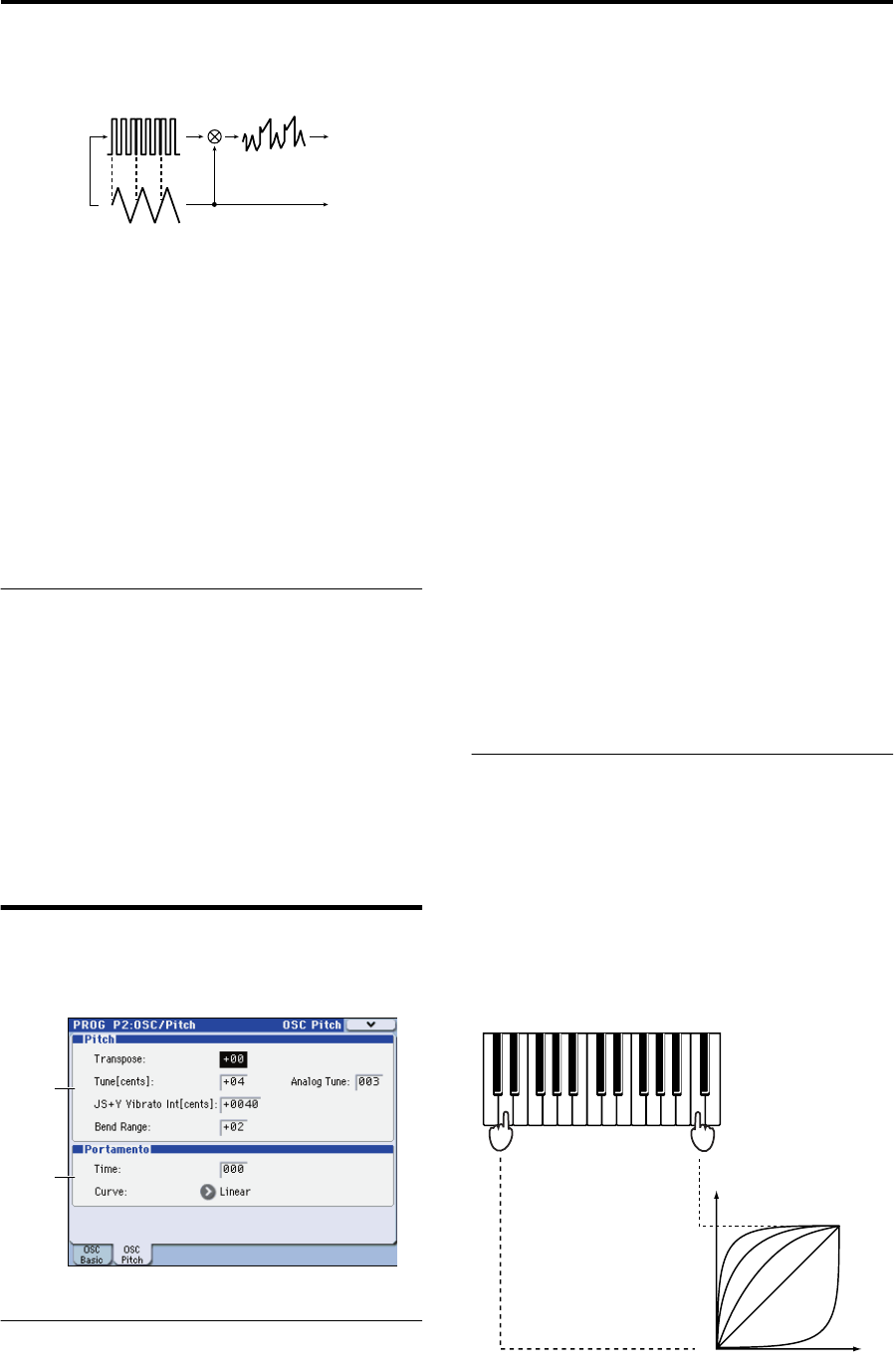
Illustration: Korg EXB-RADIAS for M3 Owner's manual, Page 41
PROG P2: OSC/Pitch 2–2: OSC1 Pitch
33
RingSync: This applies Ring and Sync modulation
simultaneously.
Semitone [–24…+24]
Specifies the amount of detuning relative to oscillator 1 in
semitone steps. Values of ±12 produce a pitch difference of
one octave, and values of ±24 produce a pitch difference of
two octaves. At a value of 0, the pitch will be the same as
oscillator 1.
Tune [–63…+63]
Specifies the amount of detuning relative to oscillator 1.
Values of ±63 produce a pitch difference of ±2 octaves, and
values of ±48 produce a pitch difference of ±1 octave. Values
near 0 produce fine adjustments in the pitch.
Note: If OSC Mod is set to Sync, adjusting the Semitone or
Tune parameters will change the pitch of the overtones. The
pitch of the fundamental will not change.
2–1c: Mixer
These parameters specify the output level of each oscillator.
The settings you make here will determine the input level to
the filter.
OSC1 Level [000…127]
Specifies the output level of oscillator 1.
OSC2 Level [000…127]
Specifies the output level of oscillator 2.
Noise Level [000…127]
Specifies the output level of the noise generator.
2–2: OSC1 Pitch
These are the pitch-related parameters.
2–2a: Pitch
Transpose [–48…+48]
Shifts the pitch produced by the oscillators in steps of a
semitone (100 cents). You can adjust this in a range of four
octaves upward or downward.
Tune[cents] [–50…+50]
Adjusts the pitch produced by the oscillators in steps of one
cent. You can adjust this in a range of –50 – +50 cents.
Analog Tune [000…127]
By adding a slight randomness to the pitch of each note as it
is played, this lets you simulate the pitch instability and
oscillator “drift” that was characteristic of analog
synthesizers. Higher settings will produce greater variations
in pitch.
JS+Y Vibrato Int [cents] (JS+Y Vibrato Intensity)
[–2400…+2400]
Moving the joystick “up” from the center detent position,
away from yourself, produces the JS+Y controller. You can
use this to scale the amount of the LFO2 applied to the pitch.
This parameter sets the maximum amount of LFO2
modulation added by JS+Y, in semitones.
As this value is increased, moving the joystick in the +Y
direction will cause the LFO2 to produce deeper pitch
modulation.
Bend Range [–12…+12]
This sets the maximum amount of pitch bend, in semitones,
when you move the joystick to the right. For normal pitch
bend, set this to a positive value.
For example, if you set this to +12 and move the joystick all
the way to the right, the pitch will rise one octave above the
original pitch.
Note: The RADIAS EXB Option is not capable of responding
to KARMA Bend Range Messages outside of the range of 0
to +12 Semitones. Values outside of that range will be
limited to stay within that range.
2–2b: Portamento
Time (Portamento Time) [000…127]
Specifies the portamento time. Portamento is a function that
creates a smooth transition in pitch between one note and
the next. With a setting of 000 there will be no portamento.
With higher settings, it will take longer to reach the pitch of
the next note played.
Curve (Portamento Curve)
[LogHard, LogMid, LogSoft, Linear, Expo]
Specifies the curve used by the portamento effect.
OSC1 Wave
OSC2 Wave
Sync
OSC1 Output
OSC2 Output
2–2a
2–2b
First note-on
Second note-on
1: LogHard
2: LogMid
3: LogSoft
4: Linear
5: Expo
Time (=“Portamento Time”)
Pitch
5
4
3
2
1