Korg EXB-RADIAS for M3 Owner's manual, Page 43

Go to Korg EXB-RADIAS for M3 Owner's manual, Page 1

1

Go to Korg EXB-RADIAS for M3 Owner's manual, Page 2

2

Go to Korg EXB-RADIAS for M3 Owner's manual, Page 3

3

Go to Korg EXB-RADIAS for M3 Owner's manual, Page 4

4

Go to Korg EXB-RADIAS for M3 Owner's manual, Page 5

5

Go to Korg EXB-RADIAS for M3 Owner's manual, Page 6

6

Go to Korg EXB-RADIAS for M3 Owner's manual, Page 7

7

Go to Korg EXB-RADIAS for M3 Owner's manual, Page 8

8

Go to Korg EXB-RADIAS for M3 Owner's manual, Page 9

9

Go to Korg EXB-RADIAS for M3 Owner's manual, Page 10

10

Go to Korg EXB-RADIAS for M3 Owner's manual, Page 11

11

Go to Korg EXB-RADIAS for M3 Owner's manual, Page 12

12

Go to Korg EXB-RADIAS for M3 Owner's manual, Page 13

13

Go to Korg EXB-RADIAS for M3 Owner's manual, Page 14

14

Go to Korg EXB-RADIAS for M3 Owner's manual, Page 15

15

Go to Korg EXB-RADIAS for M3 Owner's manual, Page 16

16

Go to Korg EXB-RADIAS for M3 Owner's manual, Page 17

17

Go to Korg EXB-RADIAS for M3 Owner's manual, Page 18

18

Go to Korg EXB-RADIAS for M3 Owner's manual, Page 19

19

Go to Korg EXB-RADIAS for M3 Owner's manual, Page 20

20

Go to Korg EXB-RADIAS for M3 Owner's manual, Page 21

21

Go to Korg EXB-RADIAS for M3 Owner's manual, Page 22

22

Go to Korg EXB-RADIAS for M3 Owner's manual, Page 23

23

Go to Korg EXB-RADIAS for M3 Owner's manual, Page 24

24

Go to Korg EXB-RADIAS for M3 Owner's manual, Page 25

25

Go to Korg EXB-RADIAS for M3 Owner's manual, Page 26

26

Go to Korg EXB-RADIAS for M3 Owner's manual, Page 27

27

Go to Korg EXB-RADIAS for M3 Owner's manual, Page 28

28

Go to Korg EXB-RADIAS for M3 Owner's manual, Page 29

29

Go to Korg EXB-RADIAS for M3 Owner's manual, Page 30

30

Go to Korg EXB-RADIAS for M3 Owner's manual, Page 31

31

Go to Korg EXB-RADIAS for M3 Owner's manual, Page 32

32

Go to Korg EXB-RADIAS for M3 Owner's manual, Page 33

33

Go to Korg EXB-RADIAS for M3 Owner's manual, Page 34

34

Go to Korg EXB-RADIAS for M3 Owner's manual, Page 35

35

Go to Korg EXB-RADIAS for M3 Owner's manual, Page 36

36

Go to Korg EXB-RADIAS for M3 Owner's manual, Page 37

37

Go to Korg EXB-RADIAS for M3 Owner's manual, Page 38

38

Go to Korg EXB-RADIAS for M3 Owner's manual, Page 39

39

Go to Korg EXB-RADIAS for M3 Owner's manual, Page 40

40

Go to Korg EXB-RADIAS for M3 Owner's manual, Page 41

41

Go to Korg EXB-RADIAS for M3 Owner's manual, Page 42

42

Go to Korg EXB-RADIAS for M3 Owner's manual, Page 43

43

Go to Korg EXB-RADIAS for M3 Owner's manual, Page 44

44

Go to Korg EXB-RADIAS for M3 Owner's manual, Page 45

45

Go to Korg EXB-RADIAS for M3 Owner's manual, Page 46

46

Go to Korg EXB-RADIAS for M3 Owner's manual, Page 47

47

Go to Korg EXB-RADIAS for M3 Owner's manual, Page 48

48

Go to Korg EXB-RADIAS for M3 Owner's manual, Page 49

49

Go to Korg EXB-RADIAS for M3 Owner's manual, Page 50

50

Go to Korg EXB-RADIAS for M3 Owner's manual, Page 51

51

Go to Korg EXB-RADIAS for M3 Owner's manual, Page 52

52

Go to Korg EXB-RADIAS for M3 Owner's manual, Page 53

53

Go to Korg EXB-RADIAS for M3 Owner's manual, Page 54

54

Go to Korg EXB-RADIAS for M3 Owner's manual, Page 55

55

Go to Korg EXB-RADIAS for M3 Owner's manual, Page 56

56

Go to Korg EXB-RADIAS for M3 Owner's manual, Page 57

57

Go to Korg EXB-RADIAS for M3 Owner's manual, Page 58

58

Go to Korg EXB-RADIAS for M3 Owner's manual, Page 59

59

Go to Korg EXB-RADIAS for M3 Owner's manual, Page 60

60

Go to Korg EXB-RADIAS for M3 Owner's manual, Page 61

61

Go to Korg EXB-RADIAS for M3 Owner's manual, Page 62

62

Go to Korg EXB-RADIAS for M3 Owner's manual, Page 63

63

Go to Korg EXB-RADIAS for M3 Owner's manual, Page 64

64

Go to Korg EXB-RADIAS for M3 Owner's manual, Page 65

65

Go to Korg EXB-RADIAS for M3 Owner's manual, Page 66

66

Go to Korg EXB-RADIAS for M3 Owner's manual, Page 67

67

Go to Korg EXB-RADIAS for M3 Owner's manual, Page 68

68

Go to Korg EXB-RADIAS for M3 Owner's manual, Page 69

69

Go to Korg EXB-RADIAS for M3 Owner's manual, Page 70

70

Go to Korg EXB-RADIAS for M3 Owner's manual, Page 71

71

Go to Korg EXB-RADIAS for M3 Owner's manual, Page 72

72

Go to Korg EXB-RADIAS for M3 Owner's manual, Page 73

73

Go to Korg EXB-RADIAS for M3 Owner's manual, Page 74

74

Go to Korg EXB-RADIAS for M3 Owner's manual, Page 75

75

Go to Korg EXB-RADIAS for M3 Owner's manual, Page 76

76

Go to Korg EXB-RADIAS for M3 Owner's manual, Page 77

77

Go to Korg EXB-RADIAS for M3 Owner's manual, Page 78

78

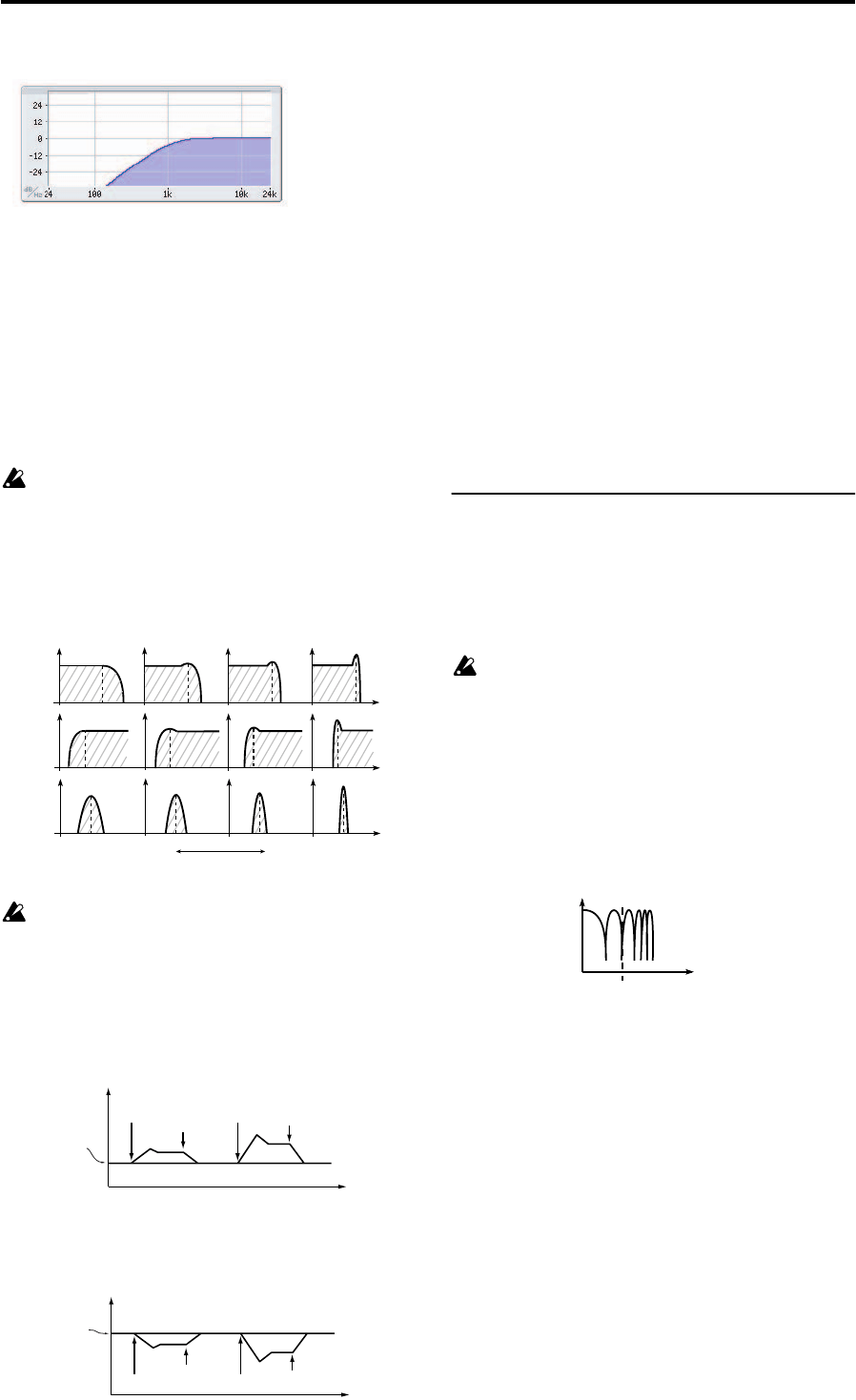
Illustration: Korg EXB-RADIAS for M3 Owner's manual, Page 43
PROG P3: Filter 3–1: Filter
35
THRU: The sound will output directly, without passing
through the filter.
Frequency (Cutoff Frequency) [000…127]
Specifies the cutoff frequency. Higher settings will raise the
cutoff frequency.
Note: Frequency can be modified by the time-varying
changes produced by EG1, position of the notes on the
keyboard (keyboard tracking), or keyboard dynamics
(velocity). The EG 1 Intensity, Keyboard Track, and
Velocity Sens parameters specify the degree to which these
will affect Frequency.
With some Frequency settings, the volume may
be extremely low or there may be no sound at all.
Resonance [000...127]
Specifies the resonance. This boosts the region near the
Frequency frequency, giving a distinctive character to the
sound. Increasing this value will produce a greater effect.
High settings of Resonance may cause distortion
for some cutoff frequencies or input sounds.
EG1 Intensity [–63…+63]
Specifies the degree to which EG 1 will modulate the cutoff
frequency. This will cause the cutoff frequency to change
over time. Increasingly positive (+) values will produce a
greater effect.
Increasingly negative (–) values will produce a greater effect
in the opposite direction.
Keyboard Track [–2.00…+2.00]
Specifies how keyboard tracking (location on the keyboard)
will modulate the cutoff frequency.
With a setting of 0, keyboard tracking will have no effect.
Positive (+) settings will cause the cutoff frequency to rise as
you play above the C4 key, or fall as you play below the C4
key. With a setting of +1.0, the change in cutoff frequency
will be proportional to the change in pitch. Negative (–)
settings will cause the cutoff frequency to fall as you play
above the C4 key, or rise as you play below the C4 key.
Note: Keyboard tracking is based on the pitch as controlled
by pitch bend, transpose, and modulation sequencer. It does
not reflect pitch changes produced by vibrato or virtual
patching.
Velocity Sens (Velocity Sensitivity) [–63…+63]
Specifies how velocity (keyboard playing dynamics) will
affect the cutoff frequency.
Positive (+) values will cause the cutoff frequency to rise as
you play more strongly. Negative (–) values will cause the
cutoff frequency to fall as you play more strongly
3–1c: Filter B
These are the parameters for filter B.
These parameters are available if filter A Routing is Serial,
Parallel, or Individual.
Type (Filter B Type) [LPF, HPF, BPF, COMB]
Selects the filter type.
This setting will affect the maximum number of voices.
LPF, HPF, BPF: These are the same –12 dB/oct type filters as
for filter A.
For more information, please see “Type/Balance (Filter
Type/Balance)” on page 34.
COMB: In a comb filter (so named for its resemblance to the
teeth of a comb), alternating bands pass and cut the signal,
giving a unique character to the sound. Increasing the cutoff
frequency (Frequency value) will space the teeth of the
comb farther apart, so that more regions are cut.
Link [Off, On]
Causes filter B to operate using the settings of filter A
parameters.
Off: Filter A and filter B parameters can be set
independently.
On: Filter B will operate using the settings of the filter A
parameters. Parameters following Frequency will use the
filter A settings.
Frequency (Cutoff Frequency) [000…127]
Resonance [000…127]
EG1 Intensity [–63…+63]
Keyboard Track [–2.0…+2.0]
Velocity Sens (Velocity Sensitivity) [–63…+63]
These are the same as for FILTER A. For details on these
parameters, please see “3–1b: Filter A” on page 34.
High Pass (–12dB/oct)
The effect of resonance
LPF
HPF
BPF
Low resonance setting High resonance setting
Note on
Note off
Note on
Note off
Cutoff frequency
Int=+32
Int=0
Int=+63
Time
Cutoff frequency
specified by
“Frequency”
Note on
Note off
Note on
Note off
Cutoff frequency
Int=–32
Int=0
Int=–63
Time
Cutoff frequency
specified by
“Frequency”
COMB (Comb Filter)
Cutoff frequency
Frequency