Korg EXB-RADIAS for M3 Owner's manual, Page 49

Go to Korg EXB-RADIAS for M3 Owner's manual, Page 1

1

Go to Korg EXB-RADIAS for M3 Owner's manual, Page 2

2

Go to Korg EXB-RADIAS for M3 Owner's manual, Page 3

3

Go to Korg EXB-RADIAS for M3 Owner's manual, Page 4

4

Go to Korg EXB-RADIAS for M3 Owner's manual, Page 5

5

Go to Korg EXB-RADIAS for M3 Owner's manual, Page 6

6

Go to Korg EXB-RADIAS for M3 Owner's manual, Page 7

7

Go to Korg EXB-RADIAS for M3 Owner's manual, Page 8

8

Go to Korg EXB-RADIAS for M3 Owner's manual, Page 9

9

Go to Korg EXB-RADIAS for M3 Owner's manual, Page 10

10

Go to Korg EXB-RADIAS for M3 Owner's manual, Page 11

11

Go to Korg EXB-RADIAS for M3 Owner's manual, Page 12

12

Go to Korg EXB-RADIAS for M3 Owner's manual, Page 13

13

Go to Korg EXB-RADIAS for M3 Owner's manual, Page 14

14

Go to Korg EXB-RADIAS for M3 Owner's manual, Page 15

15

Go to Korg EXB-RADIAS for M3 Owner's manual, Page 16

16

Go to Korg EXB-RADIAS for M3 Owner's manual, Page 17

17

Go to Korg EXB-RADIAS for M3 Owner's manual, Page 18

18

Go to Korg EXB-RADIAS for M3 Owner's manual, Page 19

19

Go to Korg EXB-RADIAS for M3 Owner's manual, Page 20

20

Go to Korg EXB-RADIAS for M3 Owner's manual, Page 21

21

Go to Korg EXB-RADIAS for M3 Owner's manual, Page 22

22

Go to Korg EXB-RADIAS for M3 Owner's manual, Page 23

23

Go to Korg EXB-RADIAS for M3 Owner's manual, Page 24

24

Go to Korg EXB-RADIAS for M3 Owner's manual, Page 25

25

Go to Korg EXB-RADIAS for M3 Owner's manual, Page 26

26

Go to Korg EXB-RADIAS for M3 Owner's manual, Page 27

27

Go to Korg EXB-RADIAS for M3 Owner's manual, Page 28

28

Go to Korg EXB-RADIAS for M3 Owner's manual, Page 29

29

Go to Korg EXB-RADIAS for M3 Owner's manual, Page 30

30

Go to Korg EXB-RADIAS for M3 Owner's manual, Page 31

31

Go to Korg EXB-RADIAS for M3 Owner's manual, Page 32

32

Go to Korg EXB-RADIAS for M3 Owner's manual, Page 33

33

Go to Korg EXB-RADIAS for M3 Owner's manual, Page 34

34

Go to Korg EXB-RADIAS for M3 Owner's manual, Page 35

35

Go to Korg EXB-RADIAS for M3 Owner's manual, Page 36

36

Go to Korg EXB-RADIAS for M3 Owner's manual, Page 37

37

Go to Korg EXB-RADIAS for M3 Owner's manual, Page 38

38

Go to Korg EXB-RADIAS for M3 Owner's manual, Page 39

39

Go to Korg EXB-RADIAS for M3 Owner's manual, Page 40

40

Go to Korg EXB-RADIAS for M3 Owner's manual, Page 41

41

Go to Korg EXB-RADIAS for M3 Owner's manual, Page 42

42

Go to Korg EXB-RADIAS for M3 Owner's manual, Page 43

43

Go to Korg EXB-RADIAS for M3 Owner's manual, Page 44

44

Go to Korg EXB-RADIAS for M3 Owner's manual, Page 45

45

Go to Korg EXB-RADIAS for M3 Owner's manual, Page 46

46

Go to Korg EXB-RADIAS for M3 Owner's manual, Page 47

47

Go to Korg EXB-RADIAS for M3 Owner's manual, Page 48

48

Go to Korg EXB-RADIAS for M3 Owner's manual, Page 49

49

Go to Korg EXB-RADIAS for M3 Owner's manual, Page 50

50

Go to Korg EXB-RADIAS for M3 Owner's manual, Page 51

51

Go to Korg EXB-RADIAS for M3 Owner's manual, Page 52

52

Go to Korg EXB-RADIAS for M3 Owner's manual, Page 53

53

Go to Korg EXB-RADIAS for M3 Owner's manual, Page 54

54

Go to Korg EXB-RADIAS for M3 Owner's manual, Page 55

55

Go to Korg EXB-RADIAS for M3 Owner's manual, Page 56

56

Go to Korg EXB-RADIAS for M3 Owner's manual, Page 57

57

Go to Korg EXB-RADIAS for M3 Owner's manual, Page 58

58

Go to Korg EXB-RADIAS for M3 Owner's manual, Page 59

59

Go to Korg EXB-RADIAS for M3 Owner's manual, Page 60

60

Go to Korg EXB-RADIAS for M3 Owner's manual, Page 61

61

Go to Korg EXB-RADIAS for M3 Owner's manual, Page 62

62

Go to Korg EXB-RADIAS for M3 Owner's manual, Page 63

63

Go to Korg EXB-RADIAS for M3 Owner's manual, Page 64

64

Go to Korg EXB-RADIAS for M3 Owner's manual, Page 65

65

Go to Korg EXB-RADIAS for M3 Owner's manual, Page 66

66

Go to Korg EXB-RADIAS for M3 Owner's manual, Page 67

67

Go to Korg EXB-RADIAS for M3 Owner's manual, Page 68

68

Go to Korg EXB-RADIAS for M3 Owner's manual, Page 69

69

Go to Korg EXB-RADIAS for M3 Owner's manual, Page 70

70

Go to Korg EXB-RADIAS for M3 Owner's manual, Page 71

71

Go to Korg EXB-RADIAS for M3 Owner's manual, Page 72

72

Go to Korg EXB-RADIAS for M3 Owner's manual, Page 73

73

Go to Korg EXB-RADIAS for M3 Owner's manual, Page 74

74

Go to Korg EXB-RADIAS for M3 Owner's manual, Page 75

75

Go to Korg EXB-RADIAS for M3 Owner's manual, Page 76

76

Go to Korg EXB-RADIAS for M3 Owner's manual, Page 77

77

Go to Korg EXB-RADIAS for M3 Owner's manual, Page 78

78

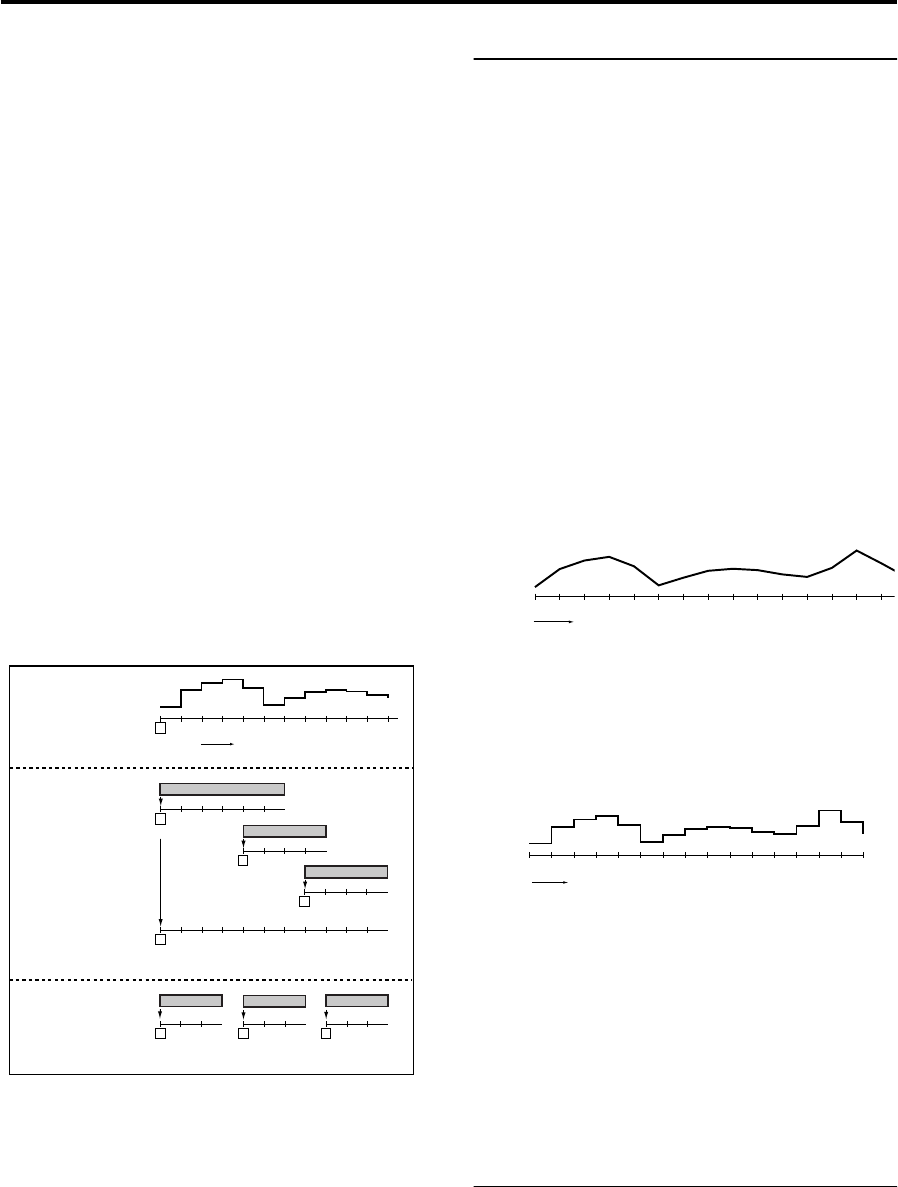
Illustration: Korg EXB-RADIAS for M3 Owner's manual, Page 49
PROG P5: EG/LFO/MSEQ 5–6: MSEQ1, 5–7: MSEQ2, 5–8: MSESQ3
41
Run Mode [One Shot, Loop]
Specifies the loop setting for playback.
One Shot: The sequence will play for only one cycle, and
will maintain the value of the last step.
Loop: The sequence will play as a loop, using the sequence
type specified by Seq Type.
Key Sync. [Off, 1st Note, Each Note]
Specifies how the sequence will be reset when note-on
occurs (i.e., when a key is played).
Off: The sequence will not be reset when note-on occurs.
1st Note: The sequence will be reset only by the first note-on
that occurs from a state in which no keys are being played.
Each Note: The sequence will be reset by each note-on.
Note: When using the KARMA function to play a phrase, we
recommend that you select Off or 1st Note. If you select
Each Note, each note generated by the KARMA function
will reset the sequence, and you may not obtain the desired
effect. If you select 1st Note, the sequence will be reset each
time you play the keyboard, and the sequence will be
synchronized to the phrase generated by the KARMA
function. In this case, if the phrase generated by the
KARMA function consists of notes or is a phrase of non-
overlapping single notes, or if Thru In Z (Program 7-1-1) is
Off and notes are not being input from the keyboard, each
note will cause a reset with the 1st Note setting, so there will
be no modulation sequence effect. Thus, you should use the
Off setting (see the illustration below).
Resolution [ 3]
Specifies the playback speed of the sequence relative to the
tempo (MIDI clock). The sequence will advance by one step
for each note value you specify here, relative to the tempo.
For example if you set this to , the sequence will advance
one step for each quarter note.
5–6(7)(8)b: SEQ1, SEQ2, SEQ3
Destination Param (Destination Parameter)
[None, Pitch…Patch8 Int.]
Selects the modulation sequence destination parameter.
None: The modulation sequence will do nothing.
Pitch: The modulation sequence will modify the overall
pitch of the sounding oscillators over a range of ±24
semitones.
Other: The modulation sequence will modify the parameter
assigned to a specific panel knob over a range of ±63 (±24 for
OSC2 Sem).
Note: If you’ve specified the same parameter for more than
one sequence, the setting of the higher-numbered sequence
will be used, in the order of SEQ 3, SEQ 2, and SEQ 1.
Motion [Smooth, Step]
Specifies how the recorded values will change when the
sequence is played
Smooth: The change will be continuous, with the values
recorded at each step connected by straight lines.
Note: If you set Destination Param to OSC1Ctrl2 (OSC1
Control 2) when OSC1 Waveform is set to DWGS, the
operation will be the same as Step even if this parameter is
set to Smooth.
Step: The value recorded at each step will be held until the
next step plays.
Step01…Step16
Step Value [–24…+24, –63…+63]
Specifies the value of the parameter that is assigned to the
modulation sequence in each steps
The value specified here will be an offset applied to the
current value of the parameter that is assigned to the
modulation sequence. For example if the current value is
+10, and the sequence data contains +10, +10, +20… starting
at step 1, the resulting value of the parameter will change as
+20, +20, +30… when playback begins.
5–6, 7, 8: Menu Command
Initialize MOD SEQ p.45
Copy MOD SEQ p.46
1
2345678910 11 12
Step
1
23
1
23
1
23
KARMA performance
example 2
1
234567891011
KARMA performance
example 1
Note #1
Note #2
Note #3
Note #2
Note #1
Key Sync = Each Note
Key Sync = 1st Note
Key Sync = 1st Note
MOD SEQ
1
23456
1
234
Note #3
1
234
1
234567891011 12 13 14 15
Steps
1
2345678910 11 12 13 14 15 16
Steps