Korg EXB-RADIAS for M3 Owner's manual, Page 33

Go to Korg EXB-RADIAS for M3 Owner's manual, Page 1

1

Go to Korg EXB-RADIAS for M3 Owner's manual, Page 2

2

Go to Korg EXB-RADIAS for M3 Owner's manual, Page 3

3

Go to Korg EXB-RADIAS for M3 Owner's manual, Page 4

4

Go to Korg EXB-RADIAS for M3 Owner's manual, Page 5

5

Go to Korg EXB-RADIAS for M3 Owner's manual, Page 6

6

Go to Korg EXB-RADIAS for M3 Owner's manual, Page 7

7

Go to Korg EXB-RADIAS for M3 Owner's manual, Page 8

8

Go to Korg EXB-RADIAS for M3 Owner's manual, Page 9

9

Go to Korg EXB-RADIAS for M3 Owner's manual, Page 10

10

Go to Korg EXB-RADIAS for M3 Owner's manual, Page 11

11

Go to Korg EXB-RADIAS for M3 Owner's manual, Page 12

12

Go to Korg EXB-RADIAS for M3 Owner's manual, Page 13

13

Go to Korg EXB-RADIAS for M3 Owner's manual, Page 14

14

Go to Korg EXB-RADIAS for M3 Owner's manual, Page 15

15

Go to Korg EXB-RADIAS for M3 Owner's manual, Page 16

16

Go to Korg EXB-RADIAS for M3 Owner's manual, Page 17

17

Go to Korg EXB-RADIAS for M3 Owner's manual, Page 18

18

Go to Korg EXB-RADIAS for M3 Owner's manual, Page 19

19

Go to Korg EXB-RADIAS for M3 Owner's manual, Page 20

20

Go to Korg EXB-RADIAS for M3 Owner's manual, Page 21

21

Go to Korg EXB-RADIAS for M3 Owner's manual, Page 22

22

Go to Korg EXB-RADIAS for M3 Owner's manual, Page 23

23

Go to Korg EXB-RADIAS for M3 Owner's manual, Page 24

24

Go to Korg EXB-RADIAS for M3 Owner's manual, Page 25

25

Go to Korg EXB-RADIAS for M3 Owner's manual, Page 26

26

Go to Korg EXB-RADIAS for M3 Owner's manual, Page 27

27

Go to Korg EXB-RADIAS for M3 Owner's manual, Page 28

28

Go to Korg EXB-RADIAS for M3 Owner's manual, Page 29

29

Go to Korg EXB-RADIAS for M3 Owner's manual, Page 30

30

Go to Korg EXB-RADIAS for M3 Owner's manual, Page 31

31

Go to Korg EXB-RADIAS for M3 Owner's manual, Page 32

32

Go to Korg EXB-RADIAS for M3 Owner's manual, Page 33

33

Go to Korg EXB-RADIAS for M3 Owner's manual, Page 34

34

Go to Korg EXB-RADIAS for M3 Owner's manual, Page 35

35

Go to Korg EXB-RADIAS for M3 Owner's manual, Page 36

36

Go to Korg EXB-RADIAS for M3 Owner's manual, Page 37

37

Go to Korg EXB-RADIAS for M3 Owner's manual, Page 38

38

Go to Korg EXB-RADIAS for M3 Owner's manual, Page 39

39

Go to Korg EXB-RADIAS for M3 Owner's manual, Page 40

40

Go to Korg EXB-RADIAS for M3 Owner's manual, Page 41

41

Go to Korg EXB-RADIAS for M3 Owner's manual, Page 42

42

Go to Korg EXB-RADIAS for M3 Owner's manual, Page 43

43

Go to Korg EXB-RADIAS for M3 Owner's manual, Page 44

44

Go to Korg EXB-RADIAS for M3 Owner's manual, Page 45

45

Go to Korg EXB-RADIAS for M3 Owner's manual, Page 46

46

Go to Korg EXB-RADIAS for M3 Owner's manual, Page 47

47

Go to Korg EXB-RADIAS for M3 Owner's manual, Page 48

48

Go to Korg EXB-RADIAS for M3 Owner's manual, Page 49

49

Go to Korg EXB-RADIAS for M3 Owner's manual, Page 50

50

Go to Korg EXB-RADIAS for M3 Owner's manual, Page 51

51

Go to Korg EXB-RADIAS for M3 Owner's manual, Page 52

52

Go to Korg EXB-RADIAS for M3 Owner's manual, Page 53

53

Go to Korg EXB-RADIAS for M3 Owner's manual, Page 54

54

Go to Korg EXB-RADIAS for M3 Owner's manual, Page 55

55

Go to Korg EXB-RADIAS for M3 Owner's manual, Page 56

56

Go to Korg EXB-RADIAS for M3 Owner's manual, Page 57

57

Go to Korg EXB-RADIAS for M3 Owner's manual, Page 58

58

Go to Korg EXB-RADIAS for M3 Owner's manual, Page 59

59

Go to Korg EXB-RADIAS for M3 Owner's manual, Page 60

60

Go to Korg EXB-RADIAS for M3 Owner's manual, Page 61

61

Go to Korg EXB-RADIAS for M3 Owner's manual, Page 62

62

Go to Korg EXB-RADIAS for M3 Owner's manual, Page 63

63

Go to Korg EXB-RADIAS for M3 Owner's manual, Page 64

64

Go to Korg EXB-RADIAS for M3 Owner's manual, Page 65

65

Go to Korg EXB-RADIAS for M3 Owner's manual, Page 66

66

Go to Korg EXB-RADIAS for M3 Owner's manual, Page 67

67

Go to Korg EXB-RADIAS for M3 Owner's manual, Page 68

68

Go to Korg EXB-RADIAS for M3 Owner's manual, Page 69

69

Go to Korg EXB-RADIAS for M3 Owner's manual, Page 70

70

Go to Korg EXB-RADIAS for M3 Owner's manual, Page 71

71

Go to Korg EXB-RADIAS for M3 Owner's manual, Page 72

72

Go to Korg EXB-RADIAS for M3 Owner's manual, Page 73

73

Go to Korg EXB-RADIAS for M3 Owner's manual, Page 74

74

Go to Korg EXB-RADIAS for M3 Owner's manual, Page 75

75

Go to Korg EXB-RADIAS for M3 Owner's manual, Page 76

76

Go to Korg EXB-RADIAS for M3 Owner's manual, Page 77

77

Go to Korg EXB-RADIAS for M3 Owner's manual, Page 78

78

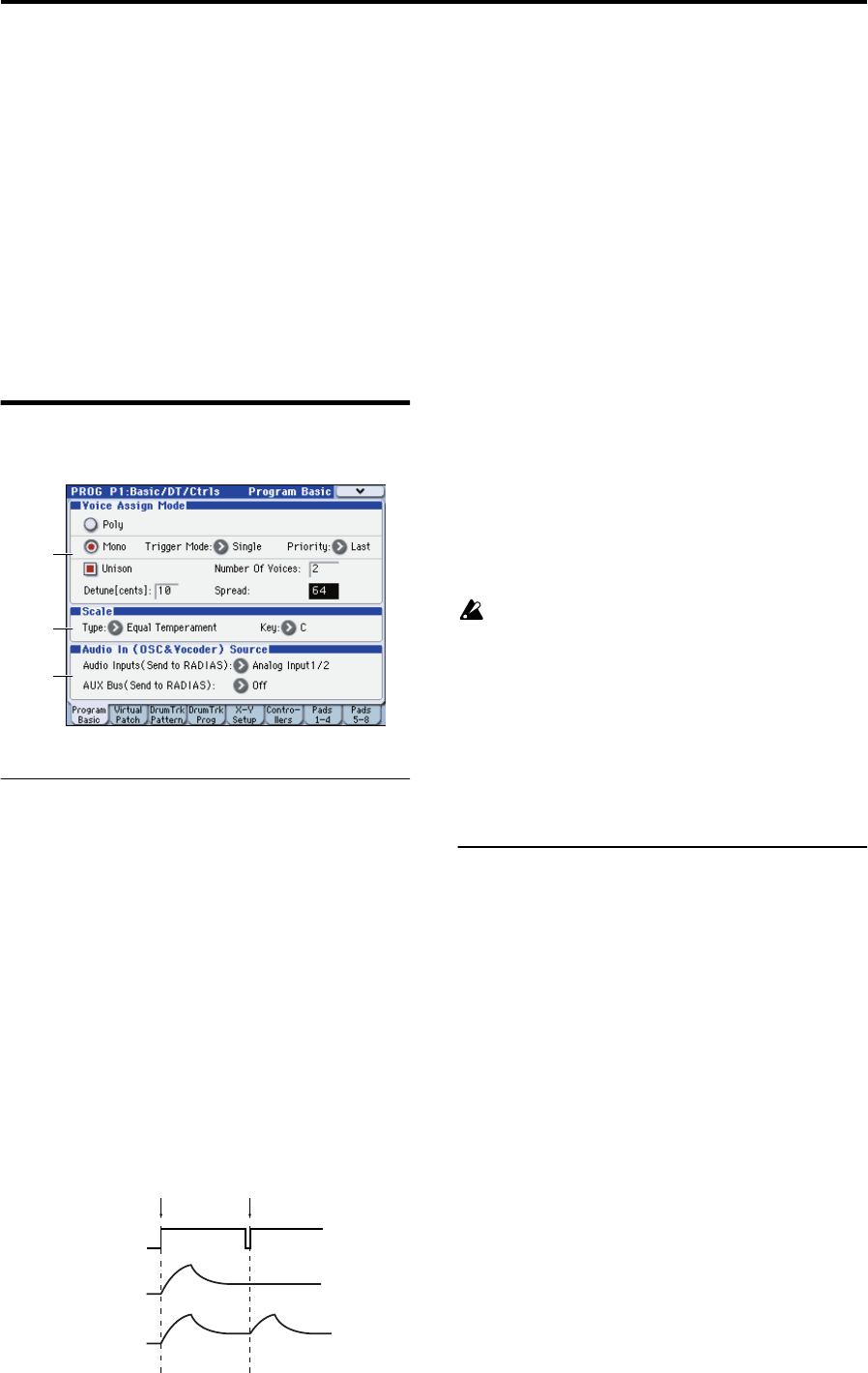
Illustration: Korg EXB-RADIAS for M3 Owner's manual, Page 33
PROG P1: Basic/DT/Ctrls 1–1: Program Basic
25
PROG P1: Basic/DT/Ctrls
Here you can make basic settings for RADIAS program.
Here you can:
Select the voice assign mode.
Specify unison and detune.
Select the basic scale for the program.
Select an audio input source for the vocoder or the
RADIAS oscillator.
Make virtual patch settings.
Make drum track settings.
Make X-Y mode settings.
Make controller and pad settings.
1–1: Program Basic
1–1a: Voice Assign Mode
Voice Assign Mode [Poly, Mono]
Selects monophonic or polyphonic operation.
Poly: The program will play polyphonically, allowing you
play chords.
Mono: The program will play monophonically, producing
only one note at a time.
Trigger Mode [Single, Multi]
This specifies whether the EGs will retrigger when you play
a second note before releasing a previously played note.
This parameter is shown if Voice Assign Mode is set to
Mono.
Single: The second and subsequent notes will not retrigger
the EG. Use this setting if you want to play legato.
Multi: The EG will be retriggered each time a new key is
pressed.
Priority [Low, High, Last]
Priority is available when the Voice Assign Mode is set to
Mono.
This parameter determines what happens when more than
one note is being held down.
Low: The lowest note will sound. Many vintage,
monophonic analog synths work this way
High: The highest note will sound.
Last: The most recently played note will sound.
Unison [On, Off]
Switches unison on/off.
On (checked): When Unison is on, the Program still plays
only one note at a time, but uses two or more stacked,
detuned voices to create a thick sound. Use the Number of
Voices and Detune[cents] parameters to set the number of
voices and amount of detuning.
Off (unchecked): The Program plays normally.
Number of Voices [2...6]
Specifies the number of voices that are stacked when using
the Unison function. When you play a note, the specified
number of voices will be heard, producing a richer tone.
Depending on other voice-related settings, the number
of voices you specify here may not actually sound.
Detune[cents] [00…99]
Specifies the amount of detuning (pitch spread) that will be
applied between each stacked voice when using the Unison
function.
Spread [000…127]
Specifies how far the panning of the voices is spread apart
when using the Unison function. The panning of each
stacked voice will be spread by the amount you specify here
1–1b: Scale
Scale[Equal Temperament…User Octave Scale15]
Selects the type of scale that the current program will use.
You can choose one of ten different scale types.
Equal Temperament: Equal temperament, which is the most
commonly used scale. Every semitone is spaced an equal
pitch distance from the next.
Pure Major: Pure major scale. Major chords in the key
specified by Scale Key will be completely harmonious.
Pure Minor: Pure minor scale. Minor chords in the key
specified by Scale Key will be completely harmonious.
Arabic: Arabic scale. It includes the quarter-tone scale
characteristic of Arabian music.
Pythagoras: Pythagorean scale, a scale based on ancient
Greek musical theory. It is particularly effective when
playing melodies.
Werkmeister: Werckmeister scale, an equal tempered scale
used in the late Baroque period.
Kirnberger: Kirnberger scale, created in the 18th century,
and used mainly for tuning harpsichords.
Slendro: Slendro scale, an Indonesian gamelan scale that
divides the octave into five notes. If the Scale Key is C, use
the C, D, F, G, and A keys.
Pelog: Pelog scale, an Indonesian gamelan scale that divides
the octave into seven notes. If the Scale Key is C, use the C,
D, E, F, G, A, and B keys.
1–1a
1–1b
1–1c
Single
Multi
Trigger
Note on
Note on