Korg EXB-RADIAS for M3 Owner's manual, Page 40

1

2

3

4

5

6

7

8

9

10

11

12

13

14

15

16

17

18

19

20

21

22

23

24

25

26

27

28

29

30

31

32

33

34

35

36

37

38

39

40

41

42

43

44

45

46

47

48

49

50

51

52

53

54

55

56

57

58

59

60

61

62

63

64

65

66

67

68

69

70

71

72

73

74

75

76

77

78
Parameter guide
32
Control2: Formant Offset [–63…+63]
Moves the entire formant frequency spectrum upward or
downward. This is equivalent to changing the size of your
mouth. A setting of 0 produces the standard formant
locations.
When Waveform: Noise
Control1: Resonance [000…127]
Adjusts the amount of resonance for the filter provided
within the noise oscillator. Higher values will emphasize the
frequency points for the pitched component within the
noise.
Control2: LPF/HPF Mix
[LPF, 002…063, CNT, 065…126, HPF]
Adjusts the mix balance between the low-pass and high-
pass filters; this will vary the brightness of the sound.
When Waveform: DWGS
Control1: --- [---]
Control2: Wave Select [01…64]
This provides various DWGS waveforms taken from
acoustic instruments and digital synthesizers. You can
choose one of 64 different DWGS waveforms.
*: The 48: Endless waveform simulates the “infinite
staircase” sound which produces the same perceived pitch
in each different octave. The “infinite staircase” produces
the sensation that you never get any higher, no matter how
long you continue playing the notes C, D, E, F, G, A, B, C, D,
E, upward.
When Waveform: AudioIn
Control1: Gain [–63…+63]
Adjusts the volume of the audio input.
Control2: Balance [L001...C064...R127]
Adjusts the balance between the L-channel (e.g., AUDIO
INPUT 1 jack) and R-channel (e.g., AUDIO INPUT 2 jack) of
the input signal selected by Audio In (Program 2-1a).
Note: If the P1: Program Basic page Unison setting (Program
1-1a) is On, certain parameters will automatically be set to
allow the input audio to be handled in stereo. In this case,
please note the following points.
• Regardless of the Balance (Control 2) setting, the signal
from AUX buses 1,3 or audio in 1 (L) will be fixed at
Balance=L001, and the signal from AUX buses 2,4 or
audio in 2 (R) will be fixed at Balance=R127.
• Regardless of the Number of Voices setting (Program 1-
1a), it will be fixed at two voices.
• If you set Spread (Program 1-1a) to 0, the Balance for
both the L-ch and the R-ch of the output will be C064
(Center). If you set Spread to 127, the L-ch and R-ch of
the oscillator output will be set to Balance of L001 and
R127 respectively.
2–1b: OSC2
These are the parameters for the oscillator 2 waveform.
Waveform (Oscillator2 Waveform)
[Saw, Square, Tri, Sine]
Selects the waveform for oscillator 2.
This setting will affect the maximum number of voices.
Saw: Sawtooth wave is suitable for creating a broad range of
typical analog synthesizer sounds such as synth bass and
synth brass.
Square: Square wave is suitable for electronic sounds or
woodwind sounds such as clarinet.
Tri: Triangle wave has fewer overtones and a stronger
fundamental than sawtooth wave or square wave. It is
suitable for mild bass sounds.
Sine: This is a sine wave.
OSC Mod (Oscillator Modulation Type)
[Off, Ring, Sync, RingSync]
Selects the oscillator modulation type.
Some settings may produce noise.
Off: The sound will be output without any modulation
being applied. You can adjust Semitone and Tune to
produce a spacious-sounding detune effect. For fuller synth
bass sounds, set the pitch of oscillator 1 and 2 one octave
apart.
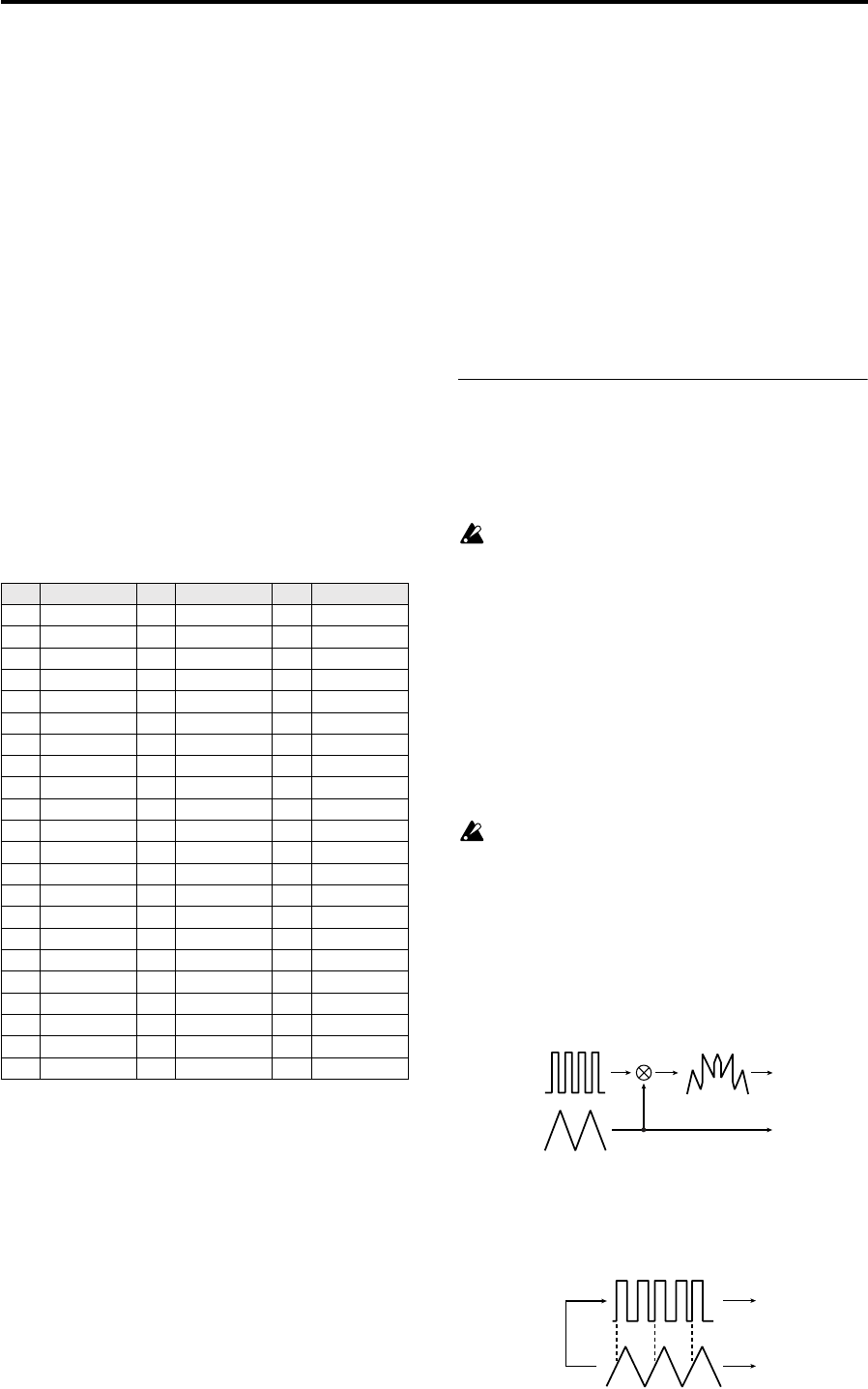
Ring: This type of modulation generates frequencies at the
sum and difference of oscillators 1 and 2. You can adjust
Semitone and Tune to create metallic sounds with little
sense of pitch. This is useful for sound effects.
Sync: This type of modulation synchronizes oscillator 2 to
the phase of oscillator 1, forcibly resetting the phase of
oscillator 2. This is effective on lead synth sounds. Use
Semitone and Tune to adjust the overtones.
No Name No Name No Name
0SynSine1 22 Digi3 44 Bell1
1SynSine2 23 Digi4 45 Bell2
2SynSine3 24 Digi5 46 Bell3
3SynSine4 25 Digi6 47 Endless*
4SynSine5 26 Digi7 48 SynVox1
5SynSine6 27 Digi8 49 SynVox2
6SynSine7 28 Digi9 50 VoxPad1
7SynWave1 29 E.Piano1 51 VoxPad2
8SynWave2 30 E.Piano2 52 VoxPad3
9SynWave3 31 E.Piano3 53 FlutePad
10 SynWave4 32 Organ1 54 EP Pad1
11 SynWave5 33 Organ2 55 EP Pad2
12 SynWave6 34 Organ3 56 Noise1
13 SynWave7 35 Organ4 57 Noise2
14 SynWire1 36 Organ5 58 Noise3
15 SynWire2 37 Clav1 59 Noise4
16 SynWire3 38 Clav2 60 Noise5
17 SynWire4 39 Guitar1 61 Noise6
18 5thSaw 40 Guitar2 62 Noise7
19 5thSqu 41 E.Bass1 63 Noise8
20 Digi1 42 E.Bass2
21 Digi2 43 E.Bass3
OSC1 Wave
OSC2 Wave
OSC1 Output
OSC2 Output
OSC1 Wave
OSC2 Wave
OSC1 Output
OSC2 Output
Sync