Korg EXB-RADIAS for M3 Owner's manual, Page 55

Go to Korg EXB-RADIAS for M3 Owner's manual, Page 1

1

Go to Korg EXB-RADIAS for M3 Owner's manual, Page 2

2

Go to Korg EXB-RADIAS for M3 Owner's manual, Page 3

3

Go to Korg EXB-RADIAS for M3 Owner's manual, Page 4

4

Go to Korg EXB-RADIAS for M3 Owner's manual, Page 5

5

Go to Korg EXB-RADIAS for M3 Owner's manual, Page 6

6

Go to Korg EXB-RADIAS for M3 Owner's manual, Page 7

7

Go to Korg EXB-RADIAS for M3 Owner's manual, Page 8

8

Go to Korg EXB-RADIAS for M3 Owner's manual, Page 9

9

Go to Korg EXB-RADIAS for M3 Owner's manual, Page 10

10

Go to Korg EXB-RADIAS for M3 Owner's manual, Page 11

11

Go to Korg EXB-RADIAS for M3 Owner's manual, Page 12

12

Go to Korg EXB-RADIAS for M3 Owner's manual, Page 13

13

Go to Korg EXB-RADIAS for M3 Owner's manual, Page 14

14

Go to Korg EXB-RADIAS for M3 Owner's manual, Page 15

15

Go to Korg EXB-RADIAS for M3 Owner's manual, Page 16

16

Go to Korg EXB-RADIAS for M3 Owner's manual, Page 17

17

Go to Korg EXB-RADIAS for M3 Owner's manual, Page 18

18

Go to Korg EXB-RADIAS for M3 Owner's manual, Page 19

19

Go to Korg EXB-RADIAS for M3 Owner's manual, Page 20

20

Go to Korg EXB-RADIAS for M3 Owner's manual, Page 21

21

Go to Korg EXB-RADIAS for M3 Owner's manual, Page 22

22

Go to Korg EXB-RADIAS for M3 Owner's manual, Page 23

23

Go to Korg EXB-RADIAS for M3 Owner's manual, Page 24

24

Go to Korg EXB-RADIAS for M3 Owner's manual, Page 25

25

Go to Korg EXB-RADIAS for M3 Owner's manual, Page 26

26

Go to Korg EXB-RADIAS for M3 Owner's manual, Page 27

27

Go to Korg EXB-RADIAS for M3 Owner's manual, Page 28

28

Go to Korg EXB-RADIAS for M3 Owner's manual, Page 29

29

Go to Korg EXB-RADIAS for M3 Owner's manual, Page 30

30

Go to Korg EXB-RADIAS for M3 Owner's manual, Page 31

31

Go to Korg EXB-RADIAS for M3 Owner's manual, Page 32

32

Go to Korg EXB-RADIAS for M3 Owner's manual, Page 33

33

Go to Korg EXB-RADIAS for M3 Owner's manual, Page 34

34

Go to Korg EXB-RADIAS for M3 Owner's manual, Page 35

35

Go to Korg EXB-RADIAS for M3 Owner's manual, Page 36

36

Go to Korg EXB-RADIAS for M3 Owner's manual, Page 37

37

Go to Korg EXB-RADIAS for M3 Owner's manual, Page 38

38

Go to Korg EXB-RADIAS for M3 Owner's manual, Page 39

39

Go to Korg EXB-RADIAS for M3 Owner's manual, Page 40

40

Go to Korg EXB-RADIAS for M3 Owner's manual, Page 41

41

Go to Korg EXB-RADIAS for M3 Owner's manual, Page 42

42

Go to Korg EXB-RADIAS for M3 Owner's manual, Page 43

43

Go to Korg EXB-RADIAS for M3 Owner's manual, Page 44

44

Go to Korg EXB-RADIAS for M3 Owner's manual, Page 45

45

Go to Korg EXB-RADIAS for M3 Owner's manual, Page 46

46

Go to Korg EXB-RADIAS for M3 Owner's manual, Page 47

47

Go to Korg EXB-RADIAS for M3 Owner's manual, Page 48

48

Go to Korg EXB-RADIAS for M3 Owner's manual, Page 49

49

Go to Korg EXB-RADIAS for M3 Owner's manual, Page 50

50

Go to Korg EXB-RADIAS for M3 Owner's manual, Page 51

51

Go to Korg EXB-RADIAS for M3 Owner's manual, Page 52

52

Go to Korg EXB-RADIAS for M3 Owner's manual, Page 53

53

Go to Korg EXB-RADIAS for M3 Owner's manual, Page 54

54

Go to Korg EXB-RADIAS for M3 Owner's manual, Page 55

55

Go to Korg EXB-RADIAS for M3 Owner's manual, Page 56

56

Go to Korg EXB-RADIAS for M3 Owner's manual, Page 57

57

Go to Korg EXB-RADIAS for M3 Owner's manual, Page 58

58

Go to Korg EXB-RADIAS for M3 Owner's manual, Page 59

59

Go to Korg EXB-RADIAS for M3 Owner's manual, Page 60

60

Go to Korg EXB-RADIAS for M3 Owner's manual, Page 61

61

Go to Korg EXB-RADIAS for M3 Owner's manual, Page 62

62

Go to Korg EXB-RADIAS for M3 Owner's manual, Page 63

63

Go to Korg EXB-RADIAS for M3 Owner's manual, Page 64

64

Go to Korg EXB-RADIAS for M3 Owner's manual, Page 65

65

Go to Korg EXB-RADIAS for M3 Owner's manual, Page 66

66

Go to Korg EXB-RADIAS for M3 Owner's manual, Page 67

67

Go to Korg EXB-RADIAS for M3 Owner's manual, Page 68

68

Go to Korg EXB-RADIAS for M3 Owner's manual, Page 69

69

Go to Korg EXB-RADIAS for M3 Owner's manual, Page 70

70

Go to Korg EXB-RADIAS for M3 Owner's manual, Page 71

71

Go to Korg EXB-RADIAS for M3 Owner's manual, Page 72

72

Go to Korg EXB-RADIAS for M3 Owner's manual, Page 73

73

Go to Korg EXB-RADIAS for M3 Owner's manual, Page 74

74

Go to Korg EXB-RADIAS for M3 Owner's manual, Page 75

75

Go to Korg EXB-RADIAS for M3 Owner's manual, Page 76

76

Go to Korg EXB-RADIAS for M3 Owner's manual, Page 77

77

Go to Korg EXB-RADIAS for M3 Owner's manual, Page 78

78

Illustration: Korg EXB-RADIAS for M3 Owner's manual, Page 55
Combi Page Select 0–1: Program T01–08, 0–2: Program T09–16
47
Combination mode
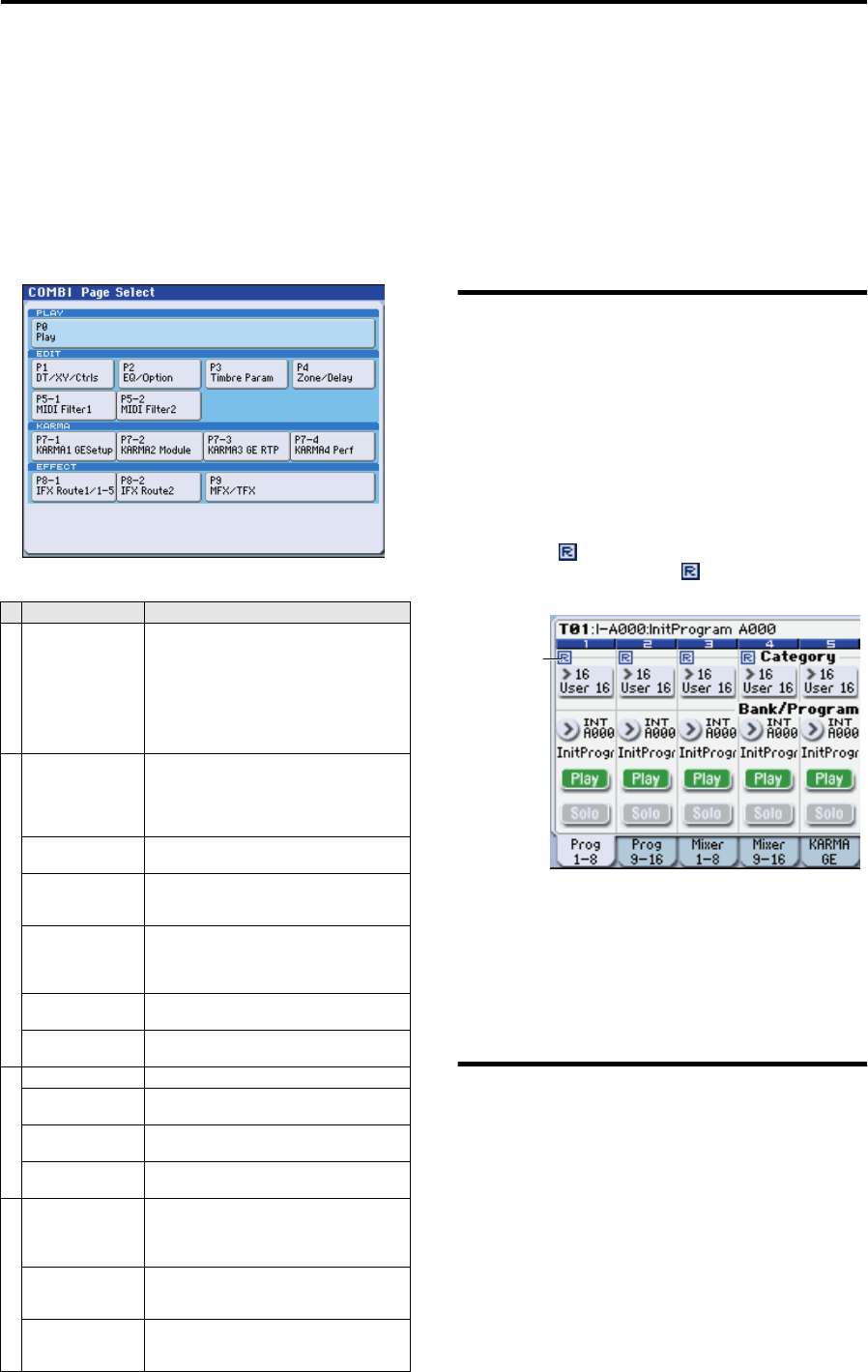
Combi Page Select
For details on how to select each page, refer to the “M3
operation guide.”
COMBI P0: Play
In this page you can select and play combinations.
In Combination mode, you can use four RADIAS programs.
0–1: Program T01–08,
0–2: Program T09–16
Here you can specify the program, Play/Mute, and Solo
On/off settings for timbres 1–8 and 9–16.
For details on selecting combinations, selecting programs,
the editable parameters, and the display, refer to the M3
operation guide and parameter guide.
R (EXB-RADIAS)
Timbres for which a RADIAS program can be used are
indicated by “ ”. If you select a program from bank INT-
F etc. for a timbre indicated by “ ”, a RADIAS program
played by the EXB-RADIAS will sound.
Use the ENABLE RADIAS setting to specify the timbres for
which a RADIAS program can be used. ( “Enable
RADIAS” on page 50)
Note: You can turn on Enable RADIAS for up to four
timbres. Even if you select a RADIAS program for a timbre
whose ENABLE RADIAS setting is turned off, it will not
sound.
0–3: Mixer T01–08,
0–4: Mixer T09–16
Here you can adjust the volume and pan settings for
Timbres 1–16.
For details on the available parameters and menu
commands, please see “0–3: Mixer T01–08, 0–4: Mixer T09–
16” on page 123 of the M3 parameter guide.
Page Main content
PLAY
P0: Play
Select and play combinations.
Program selection for each timbre.
Pan and volume settings etc. for each timbre.
Simple KARMA editing.
Audio input settings and resampling
settings.
Editing from the control surface.
(M3 PG p.120)
EDIT
P1: DT/X–Y/Ctrls
Drum track settings.
X–Y control settings.
SW1, 2, and slider function settings.
Pad note and velocity settings
(M3 PG p.138)
P2: EQ/Option
EQ settings for each timbre. (M3 PG p.147)
Settings for the EXB-RADIAS option. (p. 50)
P3: Timbre Param
Various parameter settings for each timbre
(MIDI channel, OSC selection, Pitch setting,
etc.) (M3 PG p.149)
P4: Zone/Delay
Key split and layer settings.
(Key zone and velocity zone)
Time delay from note-on to beginning of
sound. (M3 PG p.153)
P5–1:
MIDI Filter 1
MIDI transmit/receive filter 1 settings. (M3
PG p.157)
P5–2:
MIDI Filter 2
MIDI transmit/receive filter 2 settings. (M3
PG p.160)
KARMA
P7–1: KARMA1– GE Overall KARMA settings. (M3 PG p.161)
P7–2: KARMA2–
Module
Settings for each KARMA module. (M3 PG
p.169)
P7–3: KARMA3–
GE RTP
KARMA GE realtime parameter settings.
(M3 PG p.171)
P7–4: KARMA4–
Perf
KARMA performance parameter settings.
(M3 PG p.173)
EFFECT
P8–1: IFX Route1/
1–5
Oscillator output bus and master effect send
level settings.
Insert effect routing, selection, and settings.
(M3 PG p.177)
P8–2: IFX Route2
Bus settings for oscillator output.
Common FX LFO 1, 2 settings (M3 PG
p.181)
P9: MFX/TFX
Master effect routing, selection, and settings.
Total effect selection and settings. (M3 PG
p.183)
R (EXB-RADIAS)