Korg EXB-RADIAS for M3 Owner's manual, Page 46

Go to Korg EXB-RADIAS for M3 Owner's manual, Page 1

1

Go to Korg EXB-RADIAS for M3 Owner's manual, Page 2

2

Go to Korg EXB-RADIAS for M3 Owner's manual, Page 3

3

Go to Korg EXB-RADIAS for M3 Owner's manual, Page 4

4

Go to Korg EXB-RADIAS for M3 Owner's manual, Page 5

5

Go to Korg EXB-RADIAS for M3 Owner's manual, Page 6

6

Go to Korg EXB-RADIAS for M3 Owner's manual, Page 7

7

Go to Korg EXB-RADIAS for M3 Owner's manual, Page 8

8

Go to Korg EXB-RADIAS for M3 Owner's manual, Page 9

9

Go to Korg EXB-RADIAS for M3 Owner's manual, Page 10

10

Go to Korg EXB-RADIAS for M3 Owner's manual, Page 11

11

Go to Korg EXB-RADIAS for M3 Owner's manual, Page 12

12

Go to Korg EXB-RADIAS for M3 Owner's manual, Page 13

13

Go to Korg EXB-RADIAS for M3 Owner's manual, Page 14

14

Go to Korg EXB-RADIAS for M3 Owner's manual, Page 15

15

Go to Korg EXB-RADIAS for M3 Owner's manual, Page 16

16

Go to Korg EXB-RADIAS for M3 Owner's manual, Page 17

17

Go to Korg EXB-RADIAS for M3 Owner's manual, Page 18

18

Go to Korg EXB-RADIAS for M3 Owner's manual, Page 19

19

Go to Korg EXB-RADIAS for M3 Owner's manual, Page 20

20

Go to Korg EXB-RADIAS for M3 Owner's manual, Page 21

21

Go to Korg EXB-RADIAS for M3 Owner's manual, Page 22

22

Go to Korg EXB-RADIAS for M3 Owner's manual, Page 23

23

Go to Korg EXB-RADIAS for M3 Owner's manual, Page 24

24

Go to Korg EXB-RADIAS for M3 Owner's manual, Page 25

25

Go to Korg EXB-RADIAS for M3 Owner's manual, Page 26

26

Go to Korg EXB-RADIAS for M3 Owner's manual, Page 27

27

Go to Korg EXB-RADIAS for M3 Owner's manual, Page 28

28

Go to Korg EXB-RADIAS for M3 Owner's manual, Page 29

29

Go to Korg EXB-RADIAS for M3 Owner's manual, Page 30

30

Go to Korg EXB-RADIAS for M3 Owner's manual, Page 31

31

Go to Korg EXB-RADIAS for M3 Owner's manual, Page 32

32

Go to Korg EXB-RADIAS for M3 Owner's manual, Page 33

33

Go to Korg EXB-RADIAS for M3 Owner's manual, Page 34

34

Go to Korg EXB-RADIAS for M3 Owner's manual, Page 35

35

Go to Korg EXB-RADIAS for M3 Owner's manual, Page 36

36

Go to Korg EXB-RADIAS for M3 Owner's manual, Page 37

37

Go to Korg EXB-RADIAS for M3 Owner's manual, Page 38

38

Go to Korg EXB-RADIAS for M3 Owner's manual, Page 39

39

Go to Korg EXB-RADIAS for M3 Owner's manual, Page 40

40

Go to Korg EXB-RADIAS for M3 Owner's manual, Page 41

41

Go to Korg EXB-RADIAS for M3 Owner's manual, Page 42

42

Go to Korg EXB-RADIAS for M3 Owner's manual, Page 43

43

Go to Korg EXB-RADIAS for M3 Owner's manual, Page 44

44

Go to Korg EXB-RADIAS for M3 Owner's manual, Page 45

45

Go to Korg EXB-RADIAS for M3 Owner's manual, Page 46

46

Go to Korg EXB-RADIAS for M3 Owner's manual, Page 47

47

Go to Korg EXB-RADIAS for M3 Owner's manual, Page 48

48

Go to Korg EXB-RADIAS for M3 Owner's manual, Page 49

49

Go to Korg EXB-RADIAS for M3 Owner's manual, Page 50

50

Go to Korg EXB-RADIAS for M3 Owner's manual, Page 51

51

Go to Korg EXB-RADIAS for M3 Owner's manual, Page 52

52

Go to Korg EXB-RADIAS for M3 Owner's manual, Page 53

53

Go to Korg EXB-RADIAS for M3 Owner's manual, Page 54

54

Go to Korg EXB-RADIAS for M3 Owner's manual, Page 55

55

Go to Korg EXB-RADIAS for M3 Owner's manual, Page 56

56

Go to Korg EXB-RADIAS for M3 Owner's manual, Page 57

57

Go to Korg EXB-RADIAS for M3 Owner's manual, Page 58

58

Go to Korg EXB-RADIAS for M3 Owner's manual, Page 59

59

Go to Korg EXB-RADIAS for M3 Owner's manual, Page 60

60

Go to Korg EXB-RADIAS for M3 Owner's manual, Page 61

61

Go to Korg EXB-RADIAS for M3 Owner's manual, Page 62

62

Go to Korg EXB-RADIAS for M3 Owner's manual, Page 63

63

Go to Korg EXB-RADIAS for M3 Owner's manual, Page 64

64

Go to Korg EXB-RADIAS for M3 Owner's manual, Page 65

65

Go to Korg EXB-RADIAS for M3 Owner's manual, Page 66

66

Go to Korg EXB-RADIAS for M3 Owner's manual, Page 67

67

Go to Korg EXB-RADIAS for M3 Owner's manual, Page 68

68

Go to Korg EXB-RADIAS for M3 Owner's manual, Page 69

69

Go to Korg EXB-RADIAS for M3 Owner's manual, Page 70

70

Go to Korg EXB-RADIAS for M3 Owner's manual, Page 71

71

Go to Korg EXB-RADIAS for M3 Owner's manual, Page 72

72

Go to Korg EXB-RADIAS for M3 Owner's manual, Page 73

73

Go to Korg EXB-RADIAS for M3 Owner's manual, Page 74

74

Go to Korg EXB-RADIAS for M3 Owner's manual, Page 75

75

Go to Korg EXB-RADIAS for M3 Owner's manual, Page 76

76

Go to Korg EXB-RADIAS for M3 Owner's manual, Page 77

77

Go to Korg EXB-RADIAS for M3 Owner's manual, Page 78

78

Illustration: Korg EXB-RADIAS for M3 Owner's manual, Page 46
Parameter guide
38
PROG P5: EG/LFO/MSEQ
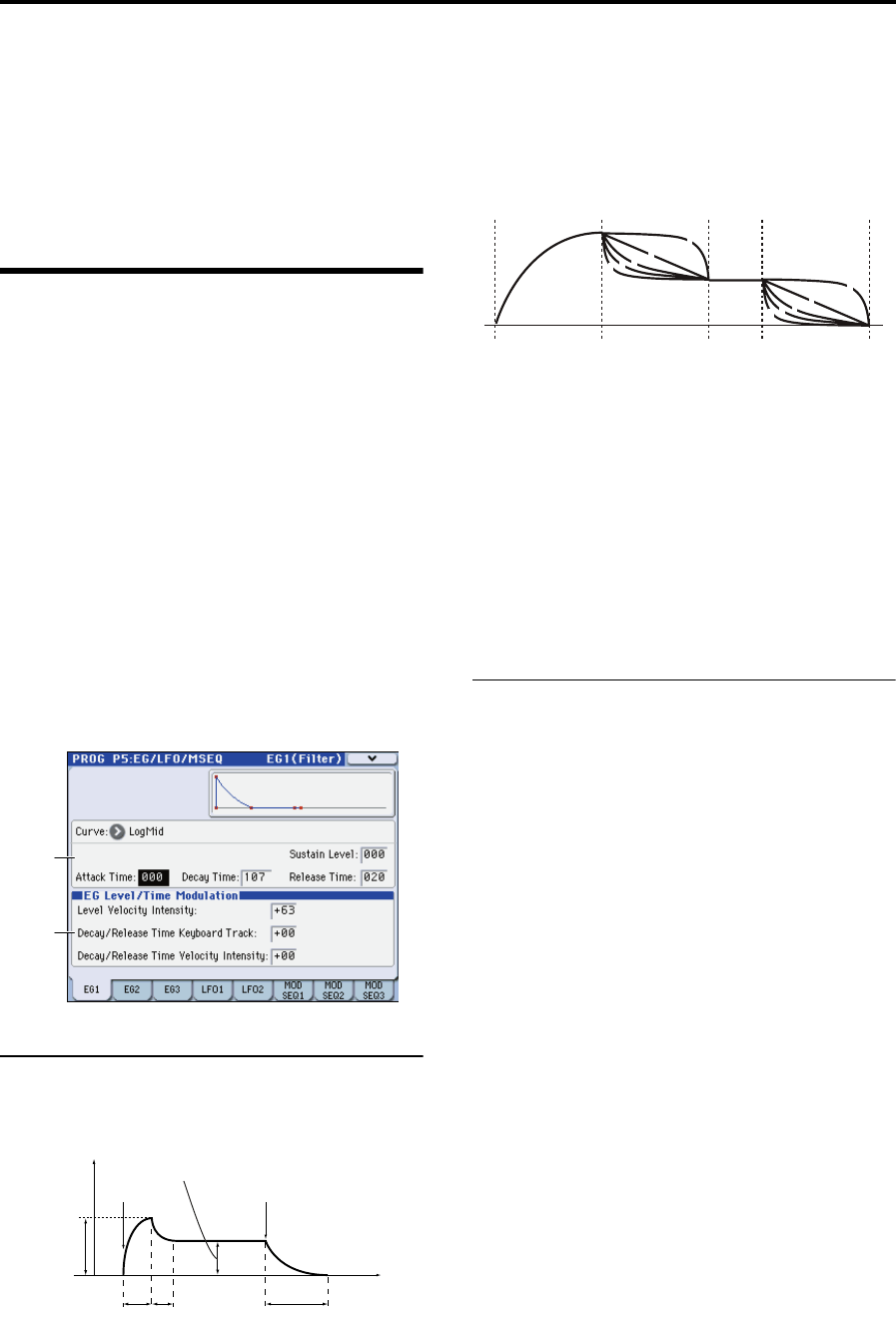
These parameters let you make EG (Envelope Generator)
settings to produce time-varying change in the oscillator
pitch, filter, and amp, make LFO settings to produce cyclic
changes in the sound, and make settings for the modulation
sequencer which applies time-varying change to sound
parameters in ways typical of analog sequencers of the past.
5–1: EG1 (Filter),
5–2: EG2 (Amp),
5–3: EG3
Here you can make settings for the EG (Envelope
Generator).
EG1 is internally connected as the envelope source that
controls the cutoff frequency of filter.
EG2 is internally connected as the envelope source that
controls the volume of the amp.
Note: You can also use virtual patching (VIRTUAL PATCH)
to assign these EGs as envelope sources for other
parameters.
Here, you can:
Specify the envelope curve.
Select the curve for the decay and release segments of
the envelope.
Make modulation settings.
5–1(2)(3)a: Envelope
These parameters specify how the EG will change over time.
Curve [LogHard…Expo]
Selects the curve for the decay and release segments of the
envelope.
Attack Time [000…127]
Specifies the time from note-on until the attack level (the
maximum value of the envelope) is reached
Decay Time [000…127]
Specifies the time from when the attack level is reached until
the sustain level is reached.
Sustain Level [000…127]
Specifies the sustain level.
Release Time [000…127]
Specifies the time from note-off until the level reaches 0.
5–1(2)(3)b: EG Level/Time Modulation
Level Velocity Intensity [–63…+63]
This allows the amplitude of the EG to be controlled by the
velocity of the note-on. Greater values allow velocity to have
more of an effect on the amplitude.
With positive (+) settings, When you play softly, the EG
amplitude will decrease; when you play strongly, the EG
amplitude will increase.
With negative (–) settings, When you play strongly, the EG
amplitude will decrease; when you play softly, the EG
amplitude will increase.
Decay/Release Time Keyboard Track [–63…+63]
This allows keyboard tracking to affect the EG’s decay time
and release time. As you increase this value, keyboard
position will make a greater difference in the EG times. The
keyboard position is relative to the C4 key.
With positive (+) settings, EG time parameters will become
shorter as you play above C4, and longer as you play below
C4.
With negative (–) settings, EG time parameters will become
shorter as you play below C4, and longer as you play above
C4.
Decay/Release Time
Velocity Intensity [–63…+63]
This allows velocity to affect the EG’s decay time and release
time. As you increase this value, velocity will make a greater
difference in the EG times.
With positive (+) settings, EG times will become longer
when you play softly, and will become shorter when you
play strongly.
With negative (–) settings, EG times will become longer
when you play strongly, and will become shorter when you
play softly.
5–1a
5–1b
Sustain level
0
Attack time
Attack level
(Amp Level)
Decay time
Release time
Time
Note on
Note off
Level
EG Curve Type
Attack
Decay
Release
1
2
3
4
5
1
2
3
4
5
1: Log Hard
2: Log Mid
3: Log Soft
4: Linear
5: Expo