Korg EXB-RADIAS for M3 Owner's manual, Page 44

Go to Korg EXB-RADIAS for M3 Owner's manual, Page 1

1

Go to Korg EXB-RADIAS for M3 Owner's manual, Page 2

2

Go to Korg EXB-RADIAS for M3 Owner's manual, Page 3

3

Go to Korg EXB-RADIAS for M3 Owner's manual, Page 4

4

Go to Korg EXB-RADIAS for M3 Owner's manual, Page 5

5

Go to Korg EXB-RADIAS for M3 Owner's manual, Page 6

6

Go to Korg EXB-RADIAS for M3 Owner's manual, Page 7

7

Go to Korg EXB-RADIAS for M3 Owner's manual, Page 8

8

Go to Korg EXB-RADIAS for M3 Owner's manual, Page 9

9

Go to Korg EXB-RADIAS for M3 Owner's manual, Page 10

10

Go to Korg EXB-RADIAS for M3 Owner's manual, Page 11

11

Go to Korg EXB-RADIAS for M3 Owner's manual, Page 12

12

Go to Korg EXB-RADIAS for M3 Owner's manual, Page 13

13

Go to Korg EXB-RADIAS for M3 Owner's manual, Page 14

14

Go to Korg EXB-RADIAS for M3 Owner's manual, Page 15

15

Go to Korg EXB-RADIAS for M3 Owner's manual, Page 16

16

Go to Korg EXB-RADIAS for M3 Owner's manual, Page 17

17

Go to Korg EXB-RADIAS for M3 Owner's manual, Page 18

18

Go to Korg EXB-RADIAS for M3 Owner's manual, Page 19

19

Go to Korg EXB-RADIAS for M3 Owner's manual, Page 20

20

Go to Korg EXB-RADIAS for M3 Owner's manual, Page 21

21

Go to Korg EXB-RADIAS for M3 Owner's manual, Page 22

22

Go to Korg EXB-RADIAS for M3 Owner's manual, Page 23

23

Go to Korg EXB-RADIAS for M3 Owner's manual, Page 24

24

Go to Korg EXB-RADIAS for M3 Owner's manual, Page 25

25

Go to Korg EXB-RADIAS for M3 Owner's manual, Page 26

26

Go to Korg EXB-RADIAS for M3 Owner's manual, Page 27

27

Go to Korg EXB-RADIAS for M3 Owner's manual, Page 28

28

Go to Korg EXB-RADIAS for M3 Owner's manual, Page 29

29

Go to Korg EXB-RADIAS for M3 Owner's manual, Page 30

30

Go to Korg EXB-RADIAS for M3 Owner's manual, Page 31

31

Go to Korg EXB-RADIAS for M3 Owner's manual, Page 32

32

Go to Korg EXB-RADIAS for M3 Owner's manual, Page 33

33

Go to Korg EXB-RADIAS for M3 Owner's manual, Page 34

34

Go to Korg EXB-RADIAS for M3 Owner's manual, Page 35

35

Go to Korg EXB-RADIAS for M3 Owner's manual, Page 36

36

Go to Korg EXB-RADIAS for M3 Owner's manual, Page 37

37

Go to Korg EXB-RADIAS for M3 Owner's manual, Page 38

38

Go to Korg EXB-RADIAS for M3 Owner's manual, Page 39

39

Go to Korg EXB-RADIAS for M3 Owner's manual, Page 40

40

Go to Korg EXB-RADIAS for M3 Owner's manual, Page 41

41

Go to Korg EXB-RADIAS for M3 Owner's manual, Page 42

42

Go to Korg EXB-RADIAS for M3 Owner's manual, Page 43

43

Go to Korg EXB-RADIAS for M3 Owner's manual, Page 44

44

Go to Korg EXB-RADIAS for M3 Owner's manual, Page 45

45

Go to Korg EXB-RADIAS for M3 Owner's manual, Page 46

46

Go to Korg EXB-RADIAS for M3 Owner's manual, Page 47

47

Go to Korg EXB-RADIAS for M3 Owner's manual, Page 48

48

Go to Korg EXB-RADIAS for M3 Owner's manual, Page 49

49

Go to Korg EXB-RADIAS for M3 Owner's manual, Page 50

50

Go to Korg EXB-RADIAS for M3 Owner's manual, Page 51

51

Go to Korg EXB-RADIAS for M3 Owner's manual, Page 52

52

Go to Korg EXB-RADIAS for M3 Owner's manual, Page 53

53

Go to Korg EXB-RADIAS for M3 Owner's manual, Page 54

54

Go to Korg EXB-RADIAS for M3 Owner's manual, Page 55

55

Go to Korg EXB-RADIAS for M3 Owner's manual, Page 56

56

Go to Korg EXB-RADIAS for M3 Owner's manual, Page 57

57

Go to Korg EXB-RADIAS for M3 Owner's manual, Page 58

58

Go to Korg EXB-RADIAS for M3 Owner's manual, Page 59

59

Go to Korg EXB-RADIAS for M3 Owner's manual, Page 60

60

Go to Korg EXB-RADIAS for M3 Owner's manual, Page 61

61

Go to Korg EXB-RADIAS for M3 Owner's manual, Page 62

62

Go to Korg EXB-RADIAS for M3 Owner's manual, Page 63

63

Go to Korg EXB-RADIAS for M3 Owner's manual, Page 64

64

Go to Korg EXB-RADIAS for M3 Owner's manual, Page 65

65

Go to Korg EXB-RADIAS for M3 Owner's manual, Page 66

66

Go to Korg EXB-RADIAS for M3 Owner's manual, Page 67

67

Go to Korg EXB-RADIAS for M3 Owner's manual, Page 68

68

Go to Korg EXB-RADIAS for M3 Owner's manual, Page 69

69

Go to Korg EXB-RADIAS for M3 Owner's manual, Page 70

70

Go to Korg EXB-RADIAS for M3 Owner's manual, Page 71

71

Go to Korg EXB-RADIAS for M3 Owner's manual, Page 72

72

Go to Korg EXB-RADIAS for M3 Owner's manual, Page 73

73

Go to Korg EXB-RADIAS for M3 Owner's manual, Page 74

74

Go to Korg EXB-RADIAS for M3 Owner's manual, Page 75

75

Go to Korg EXB-RADIAS for M3 Owner's manual, Page 76

76

Go to Korg EXB-RADIAS for M3 Owner's manual, Page 77

77

Go to Korg EXB-RADIAS for M3 Owner's manual, Page 78

78

Illustration: Korg EXB-RADIAS for M3 Owner's manual, Page 44
Parameter guide
36
PROG P4: Amp/EQ
This page controls the settings for the Drive/Wave Shape,
Amp, 3 band EQ section. Here, you can:
Specify drive or wave shaping.
Specify the amp volume level and keyboard tracking.
Specify the pan (stereo position).
Make settings for the three-band EQ.
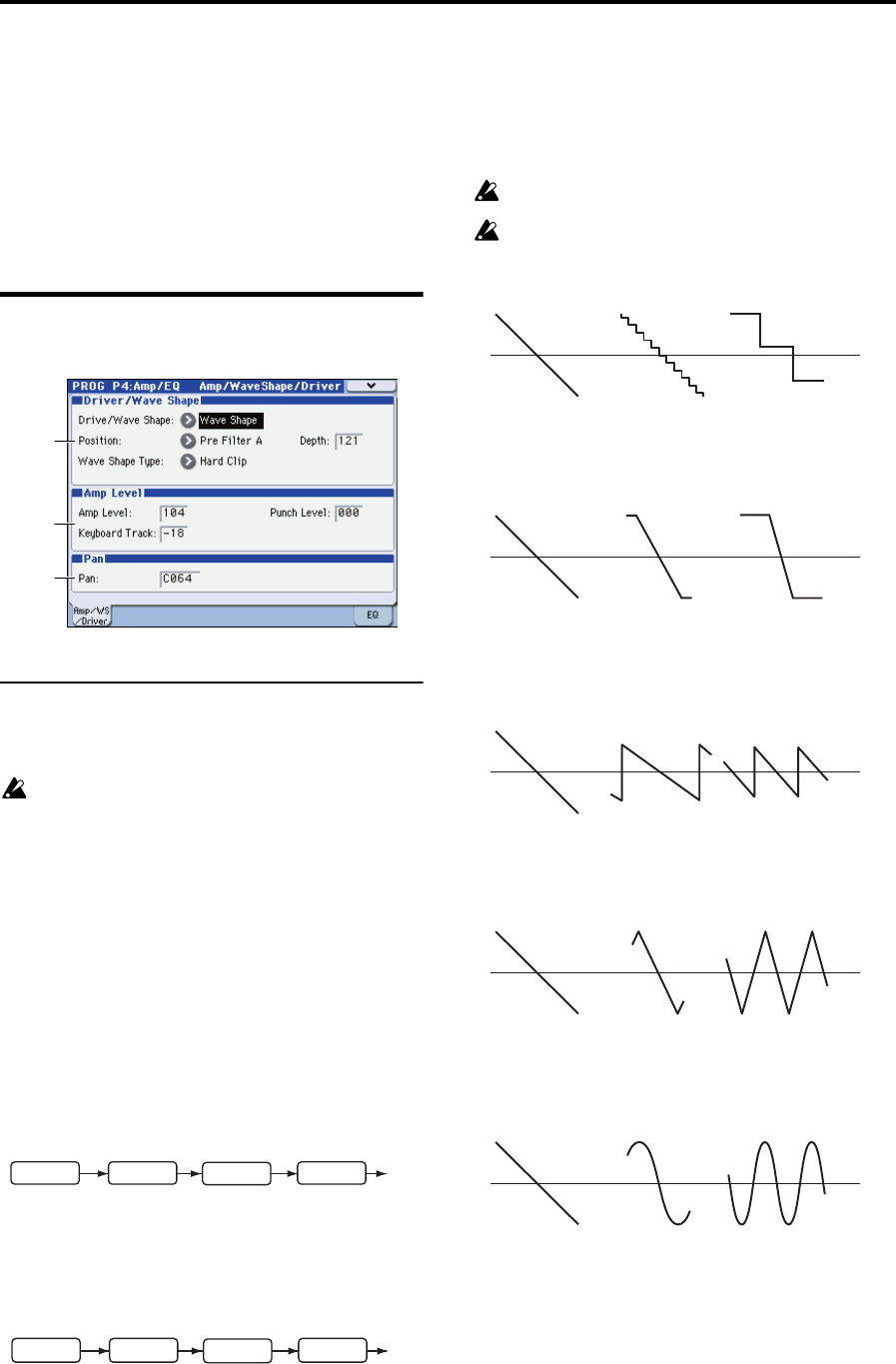
4–1: Amp/WaveShape/Driver
4–1a: Driver/Wave Shape
Drive/Wave Shape [Off, Drive, Wave Shape]
Activates the drive or wave shape functions.
This setting will affect the maximum number of voices.
Off: Drive and wave shape functions will be off.
Drive: Drive will be applied. This produces a distinctive
saturation or low-frequency boost effect. The depth of
distortion is adjusted by Depth and by the output levels of
each oscillator in the P2-1: OSC Basic page Mixer.
Wave Shape: Applies wave shaping. Wave shaping is
applied with the wave shape type selected by Wave Shape
Type. This deforms the input waveform to generate
numerous overtones that were not present in the original
signal.
Position [PreFiltA, PreAmp]
Pre Filter A: Drive or wave shaping will be applied to the
oscillator waveform before filter A. This setting is typically
used to directly modify the waveform by applying wave
shaping to the oscillator waveform.
Pre Amp: Drive or wave shaping will be applied to the
oscillator waveform before the amp. This setting is typically
used to apply drive to the output of the filter in which the
resonance has been boosted, producing a distinctive
distortion.
Depth [000…127]
Specifies the depth at which the drive or wave shape
functions will be applied.
Wave Shape Type [Decimator…Level Boost]
Selects the type of wave shape. This is shown and can be
edited if Drive/WS is set to Wave Shape.
This setting will affect the maximum number of voices.
Some settings may produce noise.
Decimator: Lowers the sampling frequency.
Hard Clip: Flattens any portion of the waveform above the
limit.
Oct Saw: Cuts the portion of the waveform above the
threshold level and moves it within the limits to the inverse
position upward or downward.
Multi Tri: Sending a sawtooth wave through this will
produce a triangle wave.
Multi Sin: Sending a sawtooth wave through this will
produce a sine wave.
Sub OSC Saw, Sub OSC Squ, Sub OSC Tri, Sub OSC Sin:
The selected waveform will sound one octave below
oscillator 1. Depth adjusts the mix amount relative to
oscillator 1.
4–1a
4–1b
4–1c
FILTER
DRIVE/WSOSC AMP
DRIVE/WS
FILTEROSC AMP
Depth: 000 Depth: 064
Depth: 127
Depth: 000 Depth: 064
Depth: 127
Depth: 000 Depth: 064
Depth: 127
Depth: 000
Depth: 064
Depth: 127
Depth: 000
Depth: 064
Depth: 127